Banner DesigningBusiness Startups
Google Display ad banner design for local small businesses stands out as one of the smartest, most visual ways to put your shop, service, or restaurant in front of nearby customers who aren’t actively searching yet.
It works. Local owners who get the visuals right see their brand pop up on news sites, blogs, and apps their customers actually use.
Here’s what this means for you:
- Visual reach across millions of sites and apps, hitting up to 90% of internet users.
- Cost-effective awareness that builds trust before someone types in your service.
- Remarketing power to bring back site visitors with tailored banners.
- Mobile-first impact since most local searches happen on phones.
- Measurable results when paired with clear calls-to-action like “Book Now” or “Get a Free Quote.”
The kicker? Great design beats big budgets every time for small businesses. Poor banners get ignored. Strong ones drive store visits, calls, and site traffic.
Why Google Display ad banner design for local small businesses delivers results in 2026
Local businesses face a tough reality. Customers scroll past generic ads daily. Your banner has maybe three seconds to stop them.
That’s where smart design shines. Responsive display ads automatically adjust across placements while Google’s machine learning tests combinations of your images, headlines, and descriptions. You upload assets once. The system does the heavy lifting.
In my experience, local plumbers, dentists, and coffee shops that master this see stronger brand recall and cheaper cost-per-click than search-only campaigns. The Display Network reaches people earlier in their journey. They see your face, your offer, your location. Later, when they need you, they remember.
What usually happens is this awareness lifts search performance too. People who saw your display ad are more likely to click and convert on search later.
Key design principles that actually work for local ads
Focus on clarity first. Your banner must scream “local” and “trustworthy” instantly.
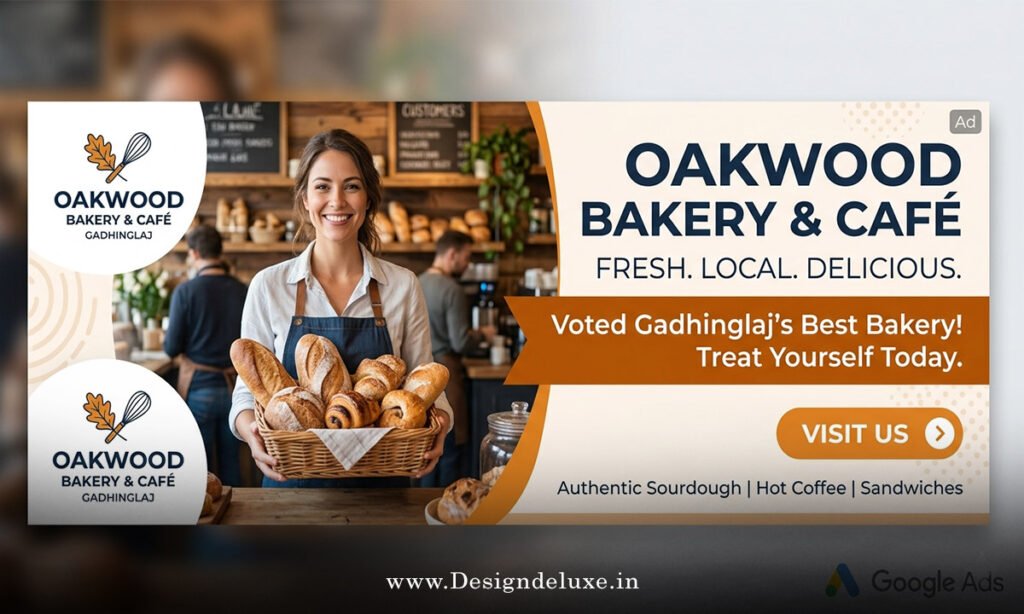
Use high-contrast colors that match your branding. Bright backgrounds with clear text win. Avoid busy backgrounds that make your offer disappear on mobile.
Keep text minimal. Google penalizes ads with too much text overlay anyway. Aim for short, punchy headlines like “Same-Day AC Repair in [Your Town]” or “Fresh Bagels Daily – Downtown Location.”
High-quality images matter. Show real people, your storefront, or happy customers. Blurry stock photos scream amateur.
One analogy that sticks: Think of your banner like the window display on Main Street. It needs to pull people in off the sidewalk. No one stops for cluttered junk. They stop for something clean, inviting, and relevant.
Ask yourself: Would I notice this ad while scrolling on my phone at the bus stop? If not, redesign it.
Essential ad sizes and formats for 2026
Responsive display ads rule now, but knowing standard sizes helps you create stronger assets.
Here’s a quick comparison table of top-performing formats for local businesses:
| Ad Format | Dimensions | Best Use Case | Why It Works for Locals |
|---|---|---|---|
| Medium Rectangle | 300×250 | Content sites, sidebars | High visibility, blends naturally |
| Leaderboard | 728×90 | Top of page awareness | Great for offers and branding |
| Mobile Banner | 320×50 | Phone users on the go | Essential for local foot traffic |
| Half Page | 300×600 | Premium placements | Builds trust with more space |
| Large Rectangle | 336×280 | In-article ads | Good for service explanations |
Upload multiple images in landscape (1200×628 recommended) and square (1200×1200) formats. Include logos separately. This gives Google’s system maximum flexibility to test what performs.
Step-by-step guide to creating effective Google Display ad banner design for local small businesses
Step 1: Define your goal.
Brand awareness for new customers? Remarketing for past visitors? Driving calls or directions? Nail this first. Everything flows from it.
Step 2: Know your audience.
Use location targeting down to specific zip codes or radius around your business. Layer in demographics and interests. A local bakery might target “foodies” and “parents” within 10 miles.
Step 3: Gather your assets.
- 5-10 high-quality images (products, team, location)
- Short and long headlines (keep under character limits)
- Descriptions that highlight benefits
- Clear logo files
- Strong calls-to-action
Step 4: Design in tools like Canva or Adobe Express.
Mobile preview constantly. Test on different devices. Ensure text remains readable when scaled down.
Step 5: Set up in Google Ads.
Create a Display campaign. Enable responsive display ads. Upload assets. Add geo-targeting and audience signals. Start with a modest daily budget—$20-50 works for testing.
Step 6: Launch and monitor.
Check performance after 7 days. Pause weak combinations. Feed the algorithm more data by optimizing winners.
What I’d do if starting fresh: Begin with remarketing lists. People who already visited your site convert at much higher rates.
Common mistakes and how to fix them
Many local owners waste money here.
Mistake 1: Too much text.
Fix: Limit to 20% text overlay max. Let headlines do the talking.
Mistake 2: Generic stock images.
Fix: Use real photos from your business. Authenticity builds instant trust.
Mistake 3: No clear offer or location.
Fix: Always include “Near You” or your town name. People need reasons to act locally.
Mistake 4: Ignoring mobile.
Fix: Design for thumbs first. Big buttons. Short messages.
Mistake 5: Set it and forget it.
Fix: Review weekly. Exclude poor placements. Refresh creatives every 4-6 weeks to fight ad fatigue.
Mistake 6: Wrong bidding strategy.
Fix: Use Maximize Conversions or Target CPA once you have data. Don’t start with manual CPC for display.
Advanced tips to stand out locally
Incorporate local landmarks subtly if relevant. Show before/after for services. Highlight reviews or “Family Owned Since 2012.”
Test video snippets in display if your budget allows. Short, looping clips of your team in action perform exceptionally well for local services.
Pair display with your Google Business Profile optimization for stronger local signals.
For deeper audience insights, check Google’s official responsive display ad guidelines. They update regularly and save headaches.
Smart local businesses also study performance benchmarks from WordStream to set realistic expectations.
And don’t overlook IAB standard ad guidelines for technical compliance that keeps your ads running smoothly.
Key Takeaways
- Google Display ad banner design for local small businesses thrives on clarity, relevance, and mobile optimization.
- Responsive ads give you scale without designing dozens of individual banners.
- Local targeting + strong visuals = better brand recall and cheaper conversions over time.
- Always include location and a clear offer in your creative.
- Test relentlessly. What works in one town might flop in another.
- Refresh assets regularly to maintain performance.
- Combine with remarketing for the highest ROI.
- Track calls, directions, and store visits—not just clicks.
Nail your Google Display ad banner design for local small businesses and you stop competing only on price. You become the obvious choice when someone needs what you sell.
Start small. Test one campaign focused on your best service. Track results for 30 days. Then scale what works. Your next customer is already browsing their favorite site—make sure they see you.
FAQs
How much should a local small business spend on Google Display ad banner design initially?
Start with $500-1500 per month while testing. Focus on learning what resonates with your audience rather than going big immediately. Many see positive movement within weeks when the creative hits right.
What makes Google Display ad banner design for local small businesses different from national campaigns?
Local campaigns demand hyper-specific messaging around your town, quick calls-to-action like “Visit Today,” and tighter geo-fencing. National ads can be broader. Yours must feel personal and immediate.
Can I design effective banners without hiring a professional?
Yes. Tools like Canva combined with Google’s responsive format handle most of the technical work. Focus on authentic images and clear benefits. Many successful local campaigns come from owners who know their customers best.