E-Mail Marketing
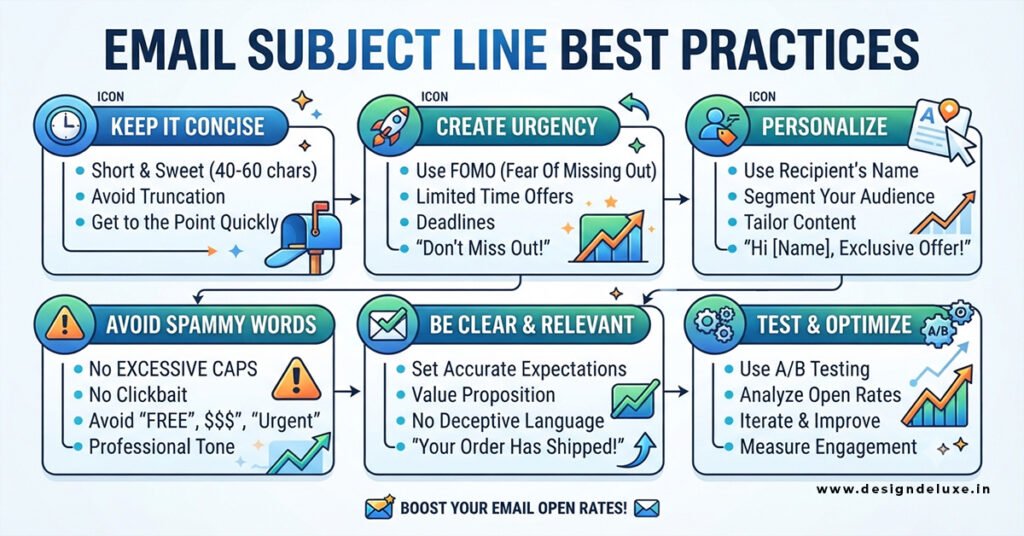
Email Subject Line Best Practices :
Your subject line is the gatekeeper. It decides whether anyone ever sees the carefully designed email you spent hours building. Get it right and open rates climb. Get it wrong and even the best Email Marketing Design: Templates That Get Opened never get a chance to work.
Here’s the short version of what moves the needle right now:
- Front-load the first 30–40 characters — that’s all most mobile users see before truncation.
- Personalization that feels real (company, behavior, or recent event) beats first-name tokens almost every time.
- Questions and curiosity gaps still outperform pure statements for many lists.
- Length sweet spots vary by email type: shorter for cold outreach, slightly longer for nurture and promotional sends.
- Preview text is part of the subject line package — treat it as such.
Why Subject Lines Matter More Than Ever
Apple’s Mail Privacy Protection continues to inflate reported open rates, so raw opens are less trustworthy than they used to be. That doesn’t make the subject line less important. It makes it more important. When people actually choose to open (or mark as spam), the subject line is still the primary signal.
In practice, a strong subject line does three jobs at once: it earns the open, sets accurate expectations, and protects deliverability by avoiding spam triggers. Weak ones do the opposite.
Ideal Length and Mobile Reality
Most people check email on phones. iPhone Mail and Gmail on Android typically show 30–48 characters of the subject before cutting it off. Front-load the value.
- Cold B2B outreach: 2–5 words or roughly 20–40 characters often wins.
- Promotional and nurture campaigns: 30–50 characters is a reliable range for many lists.
- Longer lines (60–70 characters) can work on desktop-heavy audiences, but they risk looking truncated on mobile.
Write the first 30 characters as if that’s the entire message. Then add supporting context if space allows.
Personalization That Works (and the Kind That Doesn’t)
First-name merge tags are everywhere and have lost most of their edge. Real personalization still lifts results.
Strong approaches include:
- Referencing a recent company event, product launch, hiring spike, or content they engaged with
- Naming a specific pain or goal relevant to their role
- Using behavioral triggers (abandoned cart, content download, past purchase)
Generic “Hi {{FirstName}}, quick question” lines feel templated. Specific ones feel like they were written for one person.
Format and Tone That Drive Opens
Questions consistently perform well because they create a small open loop the brain wants to close. Curiosity gaps (“Something interesting about your Q3 numbers”) and number-led lines (“3 ways teams cut churn last quarter”) also test strongly in many datasets.
Tone matters. All-lowercase or sentence case often feels more human and less “marketing” than Title Case, especially in B2B cold and mid-funnel sends. Urgency works when it’s real. Fake scarcity or aggressive spam-trigger phrases (“Act now,” “Limited time,” “Make money”) still hurt more than they help.
Emojis can help or hurt depending on placement and audience. Leading with one or two sometimes lifts opens in consumer and ecommerce lists. Mid-line or heavy emoji use often looks spammy.
Pairing Subject Lines with Preview Text
The preview text (preheader) is the second half of the inbox package. Leave it blank and email clients pull random body copy — usually the worst possible outcome. Write it deliberately so it extends the subject line instead of repeating it.
Example pairing:
- Subject: Your March report is ready
- Preview: Three numbers that stood out this month + one recommended action
This combination gives the reader a clear reason to open without giving everything away.
A Practical Testing Framework
Stop guessing. Test systematically:
- Choose one variable (length, question vs statement, personalization level, or emoji).
- Split a statistically meaningful portion of the list.
- Measure click-to-open rate and downstream conversions, not just reported opens.
- Keep winners and retire losers. Document what worked for each segment.
In my experience, teams that treat subject lines as a living test program outperform those that rely on “best practice” lists alone.
Common Mistakes That Kill Opens
- Writing for desktop and ignoring mobile truncation
- Overusing first-name personalization without context
- Stuffing the line with urgency or spammy claims
- Leaving preview text blank
- Making the subject line promise something the email doesn’t deliver (this trains people to stop opening)
Fix these and most lists see immediate improvement.
Subject Line Formulas Worth Testing
| Goal | Formula Style | Example |
|---|---|---|
| Curiosity | Incomplete thought or open loop | Something we noticed about your onboarding flow |
| Question | Direct or soft question | Quick question about your Q4 goals? |
| Specific value | Number + benefit | 3 changes that cut support tickets 22% |
| Personal signal | Event or behavior reference | Saw your team just expanded in EMEA |
| Low-pressure | Soft ask or observation | Thoughts on this approach? |
These are starting points, not rules. Adapt them to your voice and audience.
How Subject Lines Connect to the Rest of the Email
A great subject line gets the open. What happens next depends on the design and content inside. Clean, mobile-first templates with clear hierarchy and one primary CTA turn that open into a click or conversion. That’s why strong subject lines and solid Email Marketing Design: Templates That Get Opened work best as a pair rather than separate efforts.
Key Takeaways
- Front-load the first 30–40 characters for mobile.
- Real personalization (behavior, company, event) beats first-name tokens.
- Questions and curiosity gaps still earn more opens for many audiences.
- Always write purposeful preview text.
- Test one variable at a time and judge by engagement beyond reported opens.
- Match the subject line promise to the email content to protect future open rates.
- Pair strong subject lines with clean, mobile-ready templates for maximum impact.
Start with your next three campaigns. Write two subject line variants for each, force yourself to stay under the mobile truncation point, and measure what actually gets clicked. The data from your own list will beat any general guideline within a few weeks.
FAQs
How long should an email subject line be in 2026?
Aim for 20–50 characters for most mobile-first sends. Cold outreach often performs best at the shorter end (2–5 words). Longer lines can work for desktop audiences or when extra context is needed, but test against truncation risk.
Do personalized subject lines still increase open rates?
Yes, when the personalization is meaningful. Company name, recent activity, or a specific pain point still lift results. First-name-only personalization has largely lost its edge.
Should I use questions in email subject lines?
Questions frequently outperform statements because they create curiosity. They work especially well for cold outreach and mid-funnel nurture. Always test against a strong non-question control on your specific list.