E-Mail MarketingDESIGN
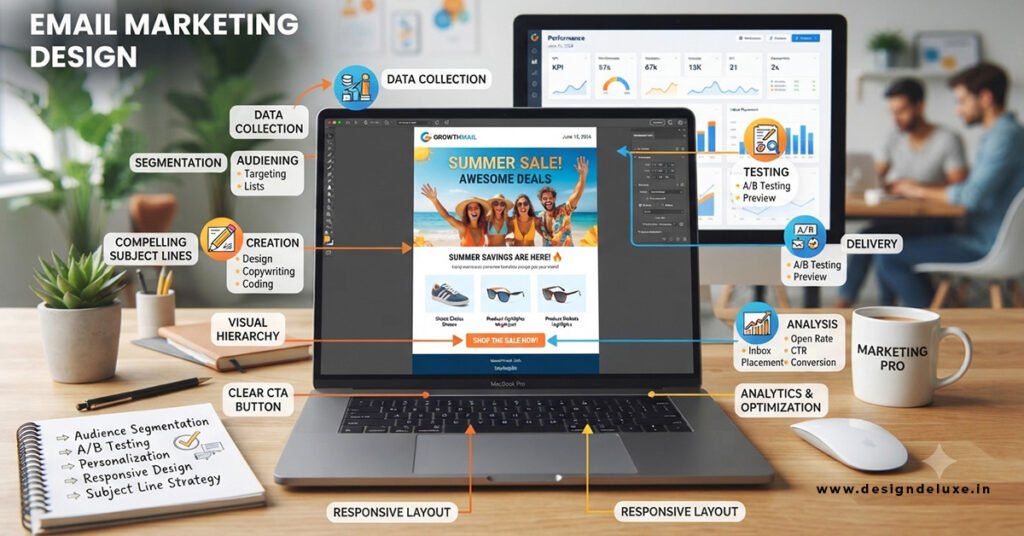
Email Marketing Design: Templates That Get Opened starts with the inbox view—sender name, subject line, and preview text—then delivers a clean, mobile-first layout that keeps people reading and coming back. Bad templates get ignored after one glance. Good ones build recognition and trust so your next send lands higher in the priority pile.
Here’s the quick overview of what actually moves the needle:
- Mobile-first single-column layouts prevent the pinch-and-zoom frustration that kills engagement on phones (where most opens happen).
- Clear visual hierarchy plus one primary CTA guides the eye without decision fatigue.
- Balanced text-to-image ratio and accessibility features protect deliverability and reach.
- Consistent branding across templates trains subscribers to recognize and open your messages faster.
- Testing and customization turn stock templates into assets that outperform generic designs.
In my experience working with teams that treat templates like afterthoughts, open rates stagnate even when subject lines are solid. The design has to support the promise made in the inbox. What usually happens is a pretty desktop mockup that collapses on mobile, images blocked, and a buried button. Readers bounce. You lose the next open.
Why Email Marketing Design: Templates That Get Opened Still Matter in 2026
Open rates have grown noisier thanks to privacy features that preload content. That doesn’t mean design is optional. A template that renders cleanly, loads fast, and feels familiar reduces the chance a subscriber marks you as spam or simply ignores future messages. Deliverability rules from major providers still penalize image-heavy or inaccessible emails. Dark mode is common. Accessibility isn’t a nice-to-have—it’s a practical requirement.
Think of a strong template like a well-fitting jacket. It doesn’t scream for attention. It just looks right every time someone puts it on. The same principle applies here. Consistent structure builds recognition. Recognition builds opens over time.
Subject lines and preview text still drive the initial open more than body design. But once someone opens, the template decides whether they stay, click, or close and forget you. Design that fails on mobile or feels off-brand quietly erodes list health.
Core Elements of High-Performing Email Templates
Start with the bones. Most reliable templates stick to a maximum width around 600 pixels. Single-column layouts win for mobile because they stack without horizontal scrolling. Multi-column designs look clever on a big screen and fall apart on a phone.
Body text needs to sit at 16px or larger. Headings can go bigger. Web-safe fonts keep rendering consistent across clients. Buttons should be real HTML (bulletproof style) with enough padding for thumbs—think 44px minimum height. Alt text on every image is non-negotiable. When images are blocked (still common), the message has to make sense in text alone.
Color contrast matters for both accessibility and dark mode. High-contrast buttons stand out. Low-contrast text disappears. Keep the image-to-text balance roughly 40/60 in favor of live text. Pure image emails get flagged more often and break when images don’t load.
Header with logo or brand name builds instant recognition. Footer with unsubscribe, physical address, and social links meets legal requirements and keeps the design clean. One primary call-to-action beats three competing ones. Secondary links are fine. Multiple equal buttons dilute action.
Building Email Marketing Design: Templates That Get Opened for Mobile First
Design for the smallest screen first, then expand. More than half of opens still happen on mobile devices. A template that forces zooming or sideways scrolling loses people before they reach the offer. Fluid widths, percentage-based containers, and media queries handle the rest. Test in actual clients—Gmail, Apple Mail, Outlook—because each renders differently.
Visual Hierarchy and the Single CTA Rule
Scan time is short. Put the most important message and the main button near the top. Short paragraphs. Bullet points where they help. White space is your friend. Clutter is the enemy. In my experience, emails with one clear next step consistently outperform those that try to do everything at once.
Step-by-Step Action Plan for Building Templates That Perform
If I were starting fresh with a beginner or intermediate team, here’s exactly what I’d do.
- Audit your current templates. Open them on a phone. Note anything that requires zooming, looks broken, or hides the CTA. Check alt text and color contrast.
- Choose or build a master template. Single-column, 600px max width, consistent fonts and colors that match your brand. Save it as a reusable base.
- Lock in the inbox elements. Write subject lines under 40–50 characters. Craft preview text that extends the subject instead of repeating it. Use a recognizable sender name (person + brand often beats generic company name).
- Balance content. Aim for mostly live text. Compress images. Add descriptive alt text. Keep total file size lean to avoid clipping.
- Place one primary CTA above the fold on mobile. Style it as a high-contrast button with action-oriented copy.
- Test across clients and devices. Send tests to Gmail, Outlook, Apple Mail, and a couple of Android devices. Check dark mode.
- Customize every send. Never blast the stock template. Swap images, rewrite copy, adjust the offer so it feels specific.
- Measure what matters. Track click-to-open rate and conversions alongside opens. Opens alone are less reliable now. Iterate based on real engagement.
This process takes a few focused hours the first time. After that, new campaigns become faster because the foundation is solid.
Common Mistakes & How to Fix Them
Most teams repeat the same errors.
Stock templates sent without changes look generic and erode trust. Fix: treat every template as a starting point. Brand it hard.
All-image designs break when images are blocked and raise spam risk. Fix: rewrite key messages as text and keep images supporting, not carrying, the content.
Tiny text and crowded buttons fail on mobile. Fix: enforce 16px body minimum and 44px+ touch targets.
Multiple competing CTAs create decision paralysis. Fix: pick one primary action and make everything else secondary.
Ignoring accessibility and dark mode leaves people out and can hurt rendering. Fix: check contrast ratios, add alt text, and preview in dark mode.
Inconsistent branding across sends trains subscribers to ignore you. Fix: lock logo placement, colors, and fonts in the master template.
These fixes are straightforward. The hard part is committing to them on every campaign.
Comparison of Template Approaches
| Approach | Strengths | Weaknesses | Best For |
|---|---|---|---|
| Fully custom coded | Total control, lightweight code | Time-intensive, requires technical skill | Brands with dedicated designers |
| Drag-and-drop ESP templates | Fast, built-in responsive features | Can look similar to competitors if not customized | Most beginner & intermediate teams |
| Hybrid (master template + modules) | Consistency + flexibility | Needs initial setup discipline | Growing lists that send frequently |
| Pure image-based | Visually striking when images load | Breaks often, spam risk, accessibility issues | Rarely recommended |
The hybrid route usually wins for practical teams. Build once, modularize, reuse.
For deeper reading on design fundamentals, see HubSpot’s guide to email design best practices. Mobile-specific tactics are covered well in Constant Contact’s mobile design recommendations. Benchmarks and performance context appear in recent industry reports such as those summarized by MailerLite’s open-rate research.
Key Takeaways
- Subject line and preview text open the door; clean mobile-first design keeps people walking through it.
- Single-column, 600px templates with 16px+ body text and one clear CTA outperform fancy multi-column layouts.
- Customize every template. Stock designs signal low effort.
- Accessibility and dark-mode readiness protect reach and professionalism.
- Balance text and images. Live text carries the message when images fail.
- Test across real clients and devices before every major send.
- Track click-to-open and conversion metrics more than raw opens.
- Consistency across templates builds the recognition that compounds into higher long-term open rates.
Strong Email Marketing Design: Templates That Get Opened turn casual subscribers into reliable openers. The next step is simple: pull up your last three campaigns on a phone right now. Fix the biggest mobile issue you see, lock it into a master template, and send the next campaign from that improved base. Results compound fast when the foundation stops working against you.
FAQs
What makes Email Marketing Design: Templates That Get Opened more effective than generic designs?
Customized mobile-first templates with consistent branding, readable text, and one clear CTA reduce friction and build recognition. Generic stock templates look like everyone else’s and get treated that way.
How important is mobile optimization for Email Marketing Design: Templates That Get Opened?
Extremely. Most opens happen on phones. A template that requires zooming or horizontal scrolling loses readers before they see the offer. Design for the small screen first.
Can better templates really improve open rates over time?
Yes—indirectly. Clean, reliable design improves the experience, which reduces spam complaints and unsubscribes while increasing the chance people open your next message. Subject lines still drive the first open; design protects the relationship that drives the rest.