AD Video / Motion GraphicsBanner DesigningBrand Packaging
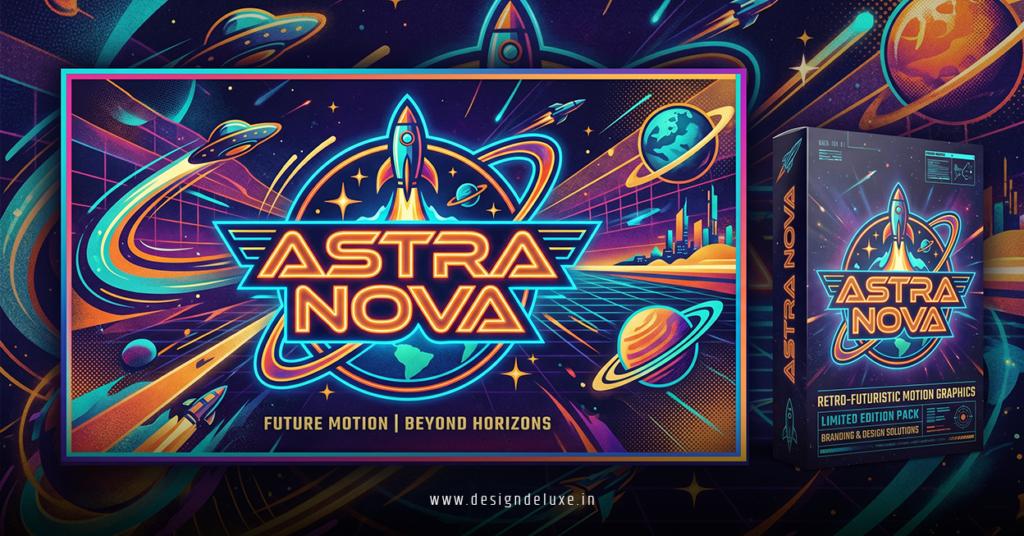
Retro futurism motion graphics logo banner packaging grabs attention like a chrome-plated rocket blasting off from a 1950s diner. It fuses yesterday’s wild dreams of tomorrow with slick, animated visuals perfect for modern branding. Think glowing neon logos that pulse with energy, banners that unfold like holographic ads, and packaging that feels straight out of a sci-fi pulp magazine—but updated for 2026 screens and shelves.
- What it is: A style blending mid-century Space Age optimism (think atomic motifs, sleek curves, and bold typography) with dynamic motion graphics, applied to logos, digital banners, and physical packaging.
- Why it works: It evokes nostalgia while signaling innovation—ideal for tech, fashion, gaming, and consumer brands chasing memorable identities.
- Key appeal in 2026: Motion makes static designs pop on social, websites, and product unboxings. It stands out in crowded feeds and store aisles.
- Who needs it: Beginners building portfolios or intermediate designers leveling up client work for eye-catching results.
This approach delivers instant brand recognition and emotional pull. Here’s how to make it happen without the usual headaches.
Defining Retro Futurism Motion Graphics Logo Banner Packaging
Retro futurism motion graphics logo banner packaging isn’t just slapping old fonts on new stuff. It revives optimistic visions from the 1950s-1980s—flying cars, ray guns, chrome everything—then animates them with today’s tools. Logos morph or glow. Banners reveal elements with glitch or scanline effects. Packaging uses metallic prints that hint at interactivity via AR or video tie-ins.
The kicker? It feels playful yet premium. Brands use it to humanize tech or energize everyday products. In my experience, clients light up when a logo doesn’t just sit there—it moves.
What usually happens is designers start with static concepts then layer subtle animations: a subtle hover pulse on a banner, orbiting elements around a central logo, or packaging mockups with animated reveals for e-commerce.
Why This Style Dominates 2026 Branding
Nostalgia sells, especially when paired with forward motion. Economic uncertainty and AI overload push people toward comforting yet exciting visuals. Retro futurism delivers cheerful optimism missing from pure dystopian cyberpunk.
Motion graphics amplify it. Static logos die in video-first platforms. Animated versions boost engagement on Instagram Reels, TikTok, and websites. For packaging, it translates to premium unboxing experiences or QR codes linking to motion demos.
Here’s the thing: It scales. A beginner can mock it up in free tools. Pros push it into full 3D renders or interactive web experiences. Either way, it cuts through noise.
Core Elements That Make It Tick
- Color palettes: Neon pinks, electric blues, chrome silvers mixed with warm pastels. High contrast for pop.
- Typography: Bold sans-serifs, condensed futuristic fonts, or retro slabs with metallic effects.
- Shapes and textures: Geometric forms, rays, stars, bubbles. Chrome, glassmorphism, subtle grain or VHS distortion.
- Motion principles: Smooth easing, parallax, particle bursts, morphing transitions. Keep it purposeful—not dizzying.
One fresh analogy: It’s like restoring a classic muscle car with electric upgrades. The soul stays retro, but the performance screams future.
Tools of the Trade for Retro Futurism Motion Graphics Logo Banner Packaging
Adobe After Effects remains king for 2D motion and logo animations. Pair it with Illustrator or Photoshop for base assets. Blender offers powerful free 3D options for chrome renders and complex scenes—great for packaging visualizations.
Figma handles static-to-motion prototypes quickly. For packaging, tools like Adobe Dimension or free mockup generators add realism. AI assistants speed up initial concepts, but hand-craft the final polish.
Comparison Table: Tools for Retro Futurism Projects
| Tool | Best For | Skill Level | Cost | Pros | Cons |
|---|---|---|---|---|---|
| After Effects | Logo animations, banners | Intermediate | Subscription | Precise controls, templates | Steep learning curve |
| Blender | 3D packaging, complex motion | Beginner+ | Free | Full pipeline, community | Render times |
| Figma | Prototyping & quick banners | Beginner | Free tier | Collaboration, easy export | Limited advanced animation |
| Photoshop + AE | Text effects, chrome looks | All levels | Subscription | Familiar, powerful effects | File management overhead |
Start simple. Master one tool before mixing.
Step-by-Step Action Plan for Beginners
- Research and Moodboard: Gather 1950s sci-fi posters, 80s VHS covers, and modern examples. Use Pinterest or Behance. Define your brand’s “future vision.”
- Sketch Static Assets: Design the logo and banner layout first. Focus on hierarchy and balance. Incorporate retro elements like atomic orbits or rocket trails.
- Build Motion: In After Effects, import assets. Add keyframes for scale, rotation, opacity. Use expressions for organic feel. Test on mobile.
- Apply to Packaging: Create 3D mockups. Add subtle animations for digital previews. Think metallic foils that “reflect” light in video.
- Test and Iterate: Share prototypes. Check loading times for web banners. Ensure accessibility—motion shouldn’t cause issues.
- Export and Deploy: Optimized MP4s for social, Lottie files for web, high-res for print packaging.
What I’d do if starting fresh: Spend one weekend on a single logo animation. Nail the chrome text effect first. Momentum builds fast.
Common Mistakes & How to Fix Them
Overdoing effects tops the list. Too many glitches or particles overwhelm. Fix: Limit to 2-3 key motions per piece. Let the retro aesthetic breathe.
Ignoring brand fit sinks projects. Pure 1950s kitsch clashes with serious fintech. Fix: Adapt—subtle chrome for corporate, bold neons for gaming.
Static thinking in a motion world. Many design great stills then forget animation. Fix: Concept everything with movement from day one.
Poor optimization kills performance. Heavy files tank websites. Fix: Compress, use efficient codecs, offer lightweight versions.
Rushing the polish. Raw renders look cheap. Fix: Add subtle noise, light blooms, and sound design where possible.
Advanced Tips for Intermediate Designers
Push boundaries with interactive banners using WebGL or Lottie. For packaging, explore AR filters that animate logos when scanned. Experiment with sound-reactive elements for music brands.
Study masters on Behance retro futurism projects for inspiration. Check Envato Elements for retro-futurism templates to accelerate workflows. Dive into Shutterstock’s retro futurism resources for stock assets done right.
Balance nostalgia with originality. Twist classics—maybe a logo where circuit patterns form retro rocket fins.
Key Takeaways
- Retro futurism motion graphics logo banner packaging blends nostalgia and innovation for standout branding.
- Prioritize purposeful motion over flashy tricks.
- Master core tools like After Effects and Blender for efficiency.
- Always tie designs back to audience and brand story.
- Test across digital and physical contexts.
- Avoid overload—subtlety amplifies impact.
- Iterate based on real feedback, not just trends.
- Start small, ship often, and refine relentlessly.
Retro futurism motion graphics logo banner packaging gives your work timeless energy with modern edge. Jump in today: Pick one tool, create a simple animated logo this week, and watch doors open. Your next project could be the one clients can’t stop sharing.
FAQs
How long does it take to create professional retro futurism motion graphics logo banner packaging?
Beginners might need 10-20 hours for a basic set. Intermediates cut that in half with templates and practiced workflows. Factor in revisions.
Can I use free tools for high-quality retro futurism motion graphics logo banner packaging?
Absolutely. Blender handles most 3D needs, and free After Effects alternatives or web apps cover basics. Results depend more on skill than software.
Is retro futurism motion graphics logo banner packaging suitable for every industry?
It shines for tech, entertainment, fashion, and lifestyle. Tone it down for finance or healthcare with subtler chrome and minimal motion.