Social Media AdvertisingGraphic Designing
Instagram Design Templates: 50+ Ready-to-Use Graphics can save you hours every week — and honestly, that’s the whole point. If you’re staring at a blank canvas wondering how to make your feed look like it belongs to a real brand instead of a hobby account, templates are the shortcut. Here’s the quick rundown before we dig in:
- What they are: pre-built, editable layouts for posts, Stories, Reels covers, and carousels.
- Why they matter: consistency builds recognition, and recognition builds trust with your audience.
- Who they’re for: solo creators, small business owners, and marketing teams who need speed without sacrificing polish.
- Where to find them: Canva, Adobe Express, and niche marketplaces like Creative Market.
- The catch: not every template fits every brand — customization still matters.
What Are Instagram Design Templates, Really?
Think of a template as a pre-cooked meal kit for your design. Someone already figured out the layout, the spacing, the visual hierarchy. You just swap in your photo, your text, your brand colors. Done.
In my experience, most beginners overcomplicate this step. They think good design means starting from scratch every single time. It doesn’t. Professional designers reuse frameworks constantly — they just call it a “system” instead of a template.
The core idea behind Instagram design templates is repeatability. You build (or buy) a solid structure once, then reuse it across dozens of posts. That’s how big brands post five times a day without their design team having a meltdown.
Why This Matters More in 2026 Than It Did Five Years Ago
Instagram’s algorithm rewards consistency and visual clarity — this isn’t a secret, it’s baked into how the platform’s own creator tools guide people toward using Stories, Reels, and carousel formats strategically, as outlined in Meta’s own Instagram for Business resources. Feeds are more crowded than ever. Attention spans? Shorter. You’ve got maybe half a second to stop someone’s scroll.
A messy, inconsistent feed reads as unprofessional in that half-second window. A clean, templated one reads as credible — even if you built it yesself last night at 11 p.m. That’s not vanity. That’s strategy.
Here’s the thing: audiences trust what looks familiar. When your Stories all share the same font pairing and color palette, people recognize your content before they even read the caption. That recognition compounds over time.
Instagram Design Templates: 50+ Ready-to-Use Graphics — Breaking Down the Categories
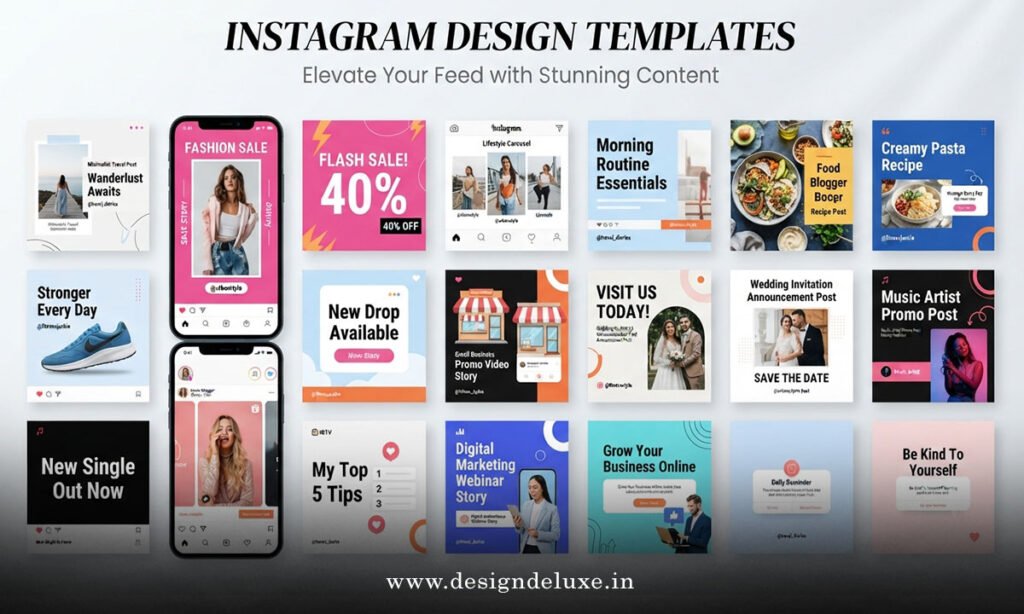
Not all templates serve the same purpose. Here’s how the 50+ ready-to-use graphics typically break down across a well-rounded content library:
- Feed post templates — quote cards, product highlights, testimonial layouts.
- Story templates — polls, countdowns, “swipe up” style CTAs, behind-the-scenes frames.
- Carousel templates — multi-slide tutorials, listicles, before/after comparisons.
- Reels cover templates — thumbnail-style graphics that make your video grid look cohesive.
- Highlight cover templates — those tiny circle icons that tidy up your profile.
Most beginner-friendly template packs bundle all five categories together, which is exactly what makes them worth the download.
Comparing Your Template Options
Picking a source for your templates is a lot like picking a gym. Some options are free but crowded and limited. Others cost money but hand you the equipment to actually get somewhere. Here’s a breakdown:
| Source | Cost | Customization Level | Best For |
|---|---|---|---|
| Canva Template Library | Free / Pro from ~$12.99/mo | High — drag-and-drop editing | Beginners, solo creators |
| Adobe Express | Free / Premium tiers available | High — integrates with Adobe ecosystem | Intermediate users wanting brand kits |
| Creative Market Bundles | One-time purchase, often $10–$40 | Medium — requires design software | Users comfortable in Photoshop/Illustrator |
| Etsy Template Shops | Varies, usually $5–$25 | Medium — often Canva-linked | Niche aesthetics (boho, minimalist, bold) |
Step-by-Step Action Plan for Beginners
Don’t just download a pile of templates and hope for the best. Follow a process.
- Audit your current feed. Screenshot your last 9 posts. Notice the chaos? That’s your starting point.
- Pick a color palette and two fonts. Lock these in before touching a single template.
- Choose one platform — Canva is the friendliest entry point for most beginners.
- Download a template pack that matches your niche (fitness, food, coaching, ecommerce — they all have dedicated sets).
- Customize five posts in one sitting. Batch the work; don’t design daily.
- Save your edited versions as new templates. Now you’ve built your own reusable system.
- Schedule and post consistently, tracking which layouts get the most saves and shares.
That’s it. Seven steps, and you’ve gone from blank-canvas panic to a repeatable content engine.
Common Mistakes & How to Fix Them
Even sharp people trip over the same few things when they start using Instagram design templates. Let’s fix them fast.
Mistake 1: Using a template exactly as downloaded. Everyone recognizes the popular Canva freebies now. Fix it by swapping fonts, adjusting spacing, or layering your own photography.
Mistake 2: Mixing too many template styles. One minimalist post, one loud neon one, one cluttered infographic — it looks like three different accounts. Fix it by sticking to one template family per week.
Mistake 3: Ignoring mobile preview. A template that looks great full-screen can look cramped in a thumbnail grid. Fix it by checking your profile grid view before publishing.
Mistake 4: Skipping brand colors entirely. Generic templates often ship with placeholder colors nobody bothers to change. Fix it by building a five-color palette and applying it to every single graphic.
Mistake 5: Overcrowding text. Templates often have generous text boxes — that doesn’t mean you should fill every inch. Fix it by cutting your copy in half, every time.
Choosing the Right Instagram Design Templates for Your Brand Voice
Here’s where a lot of people get stuck: they pick pretty templates instead of fitting templates. A luxury skincare brand and a scrappy meal-prep coach should not be using the same bold, neon-yellow layout.
Ask yourself what feeling you want people to have in that half-second scroll pause. Calm and premium? Go minimal, lots of white space, muted tones. Energetic and approachable? Bold color blocks, playful fonts, high contrast.
What usually happens is people choose based on what’s trending rather than what fits. Trending templates fade fast. Brand-fit templates age well. If you’re unsure, look at design inspiration through resources like Adobe’s Creative Cloud blog, which regularly breaks down color theory and layout principles in plain language.
Picking a template blind is a bit like grabbing a suit off the rack and hoping it fits. Sometimes it works out fine. Mostly, it just hangs wrong in the shoulders.
Building a Template System That Scales With You
Once you’ve got Instagram design templates working for individual posts, the next move is systemizing your whole content calendar around them. Assign specific templates to specific content types — Monday motivation posts get Template A, product features get Template B, and so on.
This isn’t just aesthetic tidiness. According to HubSpot’s ongoing State of Marketing research, visual consistency and content batching are consistently cited among the most efficient practices used by high-performing social teams. That’s not opinion — that’s an industry pattern worth paying attention to.
Why reinvent the wheel every single week? Build the system once, then just feed it new content.
Key Takeaways
- Instagram design templates give beginners a professional-looking shortcut without hiring a designer.
- The 50+ ready-to-use graphics category typically spans feed posts, Stories, carousels, Reels covers, and Highlight icons.
- Canva and Adobe Express remain the most beginner-friendly platforms for customization.
- Consistency in color and font builds audience recognition faster than one-off “pretty” posts.
- Customizing templates — not using them as-is — is what separates amateur feeds from branded ones.
- Batch your design work; don’t create graphics daily from scratch.
- Mobile preview and text-crowding checks catch most rookie design mistakes before they go live.
Instagram design templates aren’t a shortcut around good design — they’re a smarter starting point for it. Get your color palette locked, pick one platform, and batch-customize a week’s worth of content in a single sitting. That’s the fastest route from “my feed looks random” to “my feed looks like a brand.”
FAQs
Do Instagram design templates work for personal brands, or just businesses?
They work great for both. Personal brands often benefit even more, since consistent visuals help individual creators look established and trustworthy fast.
How many Instagram design templates do I actually need to get started?
You don’t need all 50+ ready-to-use graphics on day one. Start with five to seven core templates covering your most frequent post types, then expand as your content calendar grows.
Are free Instagram design templates good enough, or should I pay?
Free templates are genuinely solid for beginners just testing their aesthetic. Once your brand voice is locked in, paid template bundles typically offer more unique layouts that won’t feel recycled from every other account in your niche.