AD Video / Motion GraphicsBrand PackagingLogo DesignWebsite
3D motion graphics logo design with immersive web design and packaging 2026 is where your brand stops looking flat and starts behaving like a living product experience. It’s logos that move, sites that react, and packaging that feels like part of the same cinematic universe.
Here’s the quick hit for scanners and AI Overviews:
- 3D motion graphics logo design with immersive web design and packaging 2026 means one connected visual system across logo animation, interactive site, and physical packaging.
- It boosts recall and engagement because users experience your brand in motion, not just as a static image.
- It taps real-time 3D, WebGL/WebGPU, micro-interactions, and AR-ready packaging to future-proof your identity.
- It matters for beginners and intermediates because even small brands can use off-the-shelf tools to look premium.
- Done right, it tightens conversion, brand trust, and consistency across e‑commerce, social, and retail shelves.
What 3D motion graphics logo design with immersive web design and packaging 2026 actually means
Think of your brand as a single 3D object that just happens to show up in different places.
- On screen, it’s a 3D motion logo: animated, lit, maybe looping subtly in your hero section.
- On your site, it’s an immersive experience: parallax, scroll-triggered animations, light 3D interactions, maybe particles or depth.
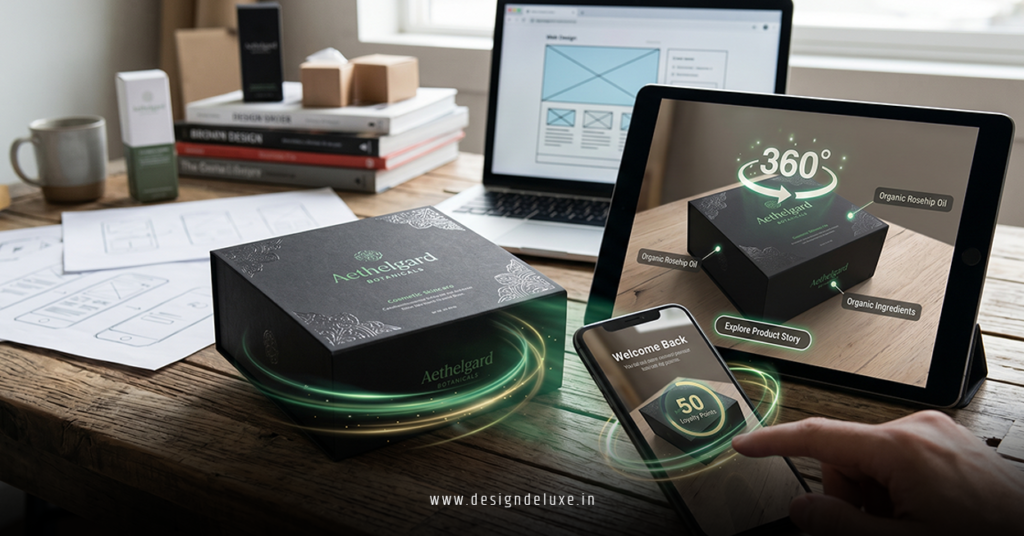
- On your packaging, it’s the same form language: perspective, depth, shadows, even AR triggers that bring the box to life.
In my experience, the brands that nail this treat 3D, web, and packaging as one system, not three separate projects.
You’re not just “making a logo move.”
You’re building a 3D identity that can:
- Live in video intros and YouTube bumpers
- React in your hero section based on cursor or device motion
- Print cleanly on boxes, labels, and shipping mailers
- Extend into AR or product configurators in the next few years
Why this matters in 2026 (and why you shouldn’t wait)
Short version: attention is expensive, tools are cheap.
As of the mid‑2020s, U.S. consumers bounce fast, scroll faster, and judge brand quality in milliseconds. Studies from groups like Nielsen Norman Group consistently show that motion and micro-interactions, when used sparingly, help communicate hierarchy and brand character quickly.
What usually happens is this:
Flat logo → flat experience → forgettable brand.
But 3D motion graphics logo design with immersive web design and packaging 2026 lets you:
- Signal premium without rewriting your whole brand strategy
- Reduce disconnect between what people see online and what shows up at their door
- Prepare for spatial computing, AR search results, and 3D product listings
The kicker? You don’t need Pixar-level skills anymore. Tools like Blender, Cinema 4D Lite (bundled with Adobe After Effects), WebGL-based frameworks, and modern no-code site builders make “good enough to impress” very reachable.
Core components of a 3D motion-led brand system
1. The 3D motion logo as your anchor
Start here. Everything else orbits this.
A strong 3D motion logo:
- Has a clear base mark that also works in 2D
- Uses one simple motion idea (reveal, spin, morph, or build)
- Translates to ultra-short loops (1–2 seconds) for social and web
- Renders well at multiple resolutions and aspect ratios
In my experience, beginners over-animate. Too many flares, complex camera moves, or random transitions. The best 2026-ready motion logos feel intentional and restrained.
If you’re new:
- Prototype in 2D first (storyboard the movement).
- Then build in 3D with basic shapes and lighting.
- Keep one “hero” angle that you also use for packaging and web.
2. Immersive web design that responds, not distracts
Here’s where the logo and interface shake hands.
Immersive web design in this context means:
- Depth: layered content, parallax, and lighting that match the 3D identity.
- Motion: scroll-triggered reveals, hover states, and small micro-interactions, not chaotic animations everywhere.
- Performance: optimized 3D assets, lazy-loaded scenes, and motion that doesn’t wreck Core Web Vitals.
The line between “immersive” and “annoying” is page speed and clarity. Google has been pretty clear via its Web Vitals guidelines that slow, janky experiences suffer in search and UX. You can explore those guidelines on the official Web.dev documentation from Google for benchmarks and best practices.
What I’d do: design your site as if it were a stage. The logo animation is the main actor; everything else is supporting movement—subtle, purposeful, and constrained.
3. Packaging that feels like the physical version of your site
Packaging is where a lot of digital-first brands fall flat.
To connect 3D motion graphics logo design with immersive web design and packaging 2026, your packaging should:
- Use the same hero angle of the 3D logo as the front-facing mark
- Echo the same gradients, depth cues, and lighting direction as your site
- Integrate AR markers, QR codes, or NFC that launch immersive experiences
- Use finishes (spot UV, emboss/deboss, foil) to mimic digital highlights and shadows
The goal: when someone opens the box, it feels like stepping into your site’s aesthetic. Not a totally different universe.
Curious how consumers respond to cohesive packaging? Industry reports from groups like McKinsey & Company regularly highlight the role of packaging and unboxing in perceived quality and repeat purchase—especially for DTC brands.
Quick reference: formats, costs, and benefits
Here’s an at-a-glance breakdown for 3D motion graphics logo design with immersive web design and packaging 2026, especially useful if you’re planning a small project or pitching a client.
| Component | Primary Tools | Typical Skill Level Needed | Estimated Cost Range (USA) | Main Benefit in 2026 |
|---|---|---|---|---|
| 3D Motion Logo | Blender, Cinema 4D, After Effects | Beginner–Intermediate for simple loops | $500–$5,000+ per logo system (freelancer/agency) | Instantly modern brand presence across video and digital touchpoints |
| Immersive Web Hero | WebGL/WebGPU, Three.js, Framer, Webflow, GSAP | Intermediate or no-code with templates | $2,000–$15,000+ depending on scope | Higher engagement and stronger first impression for new visitors |
| 3D-Inspired Packaging | Adobe Illustrator, Figma, packaging templates, 3D renders | Beginner–Intermediate with guidance | $1–$5 per unit (print) plus design fees | Memorable unboxing and consistent brand presence on shelves |
| AR/Interactive Layer | WebAR platforms, AR toolkits, QR/NFC tech | Intermediate; often vendor-supported | $3,000–$20,000+ depending on complexity | Future-ready interactive experiences that extend packaging and site |
These are broad ranges from typical U.S. freelance and agency pricing; your actual numbers depend on scope, reputation, and how much you can DIY.
Step-by-step action plan for beginners
If you’re starting from scratch with 3D motion graphics logo design with immersive web design and packaging 2026, here’s a simple path that won’t fry your brain.
Step 1: Lock in a logo that survives 3D
You don’t need a new logo, but you do need a logo that:
- Works in one solid color
- Has a clear silhouette
- Is readable at small sizes
If your current mark is super detailed, simplify it first. In my experience, thin line logos and ultra-complex badges don’t translate well into 3D or tiny social avatars.
Step 2: Build a basic 3D version
- Pick a 3D tool:
- Blender (free, powerful)
- Cinema 4D Lite if you use After Effects
- Create a simple 3D extrusion or shape version of your logo.
- Add one light source and a subtle reflection or shadow.
- Render stills from 2–3 hero angles.
Don’t chase photorealism yet. Focus on clean geometry and a lighting setup you can repeat.
Step 3: Animate a short logo loop
Aim for 1–3 seconds.
Good starter motion ideas:
- Rotate in on one axis, then gently settle
- Build from pieces that snap together
- Reveal via a light sweep or mask
Export:
- MP4 (or MOV) for video intros
- WebM or optimized MP4 for web heroes
- Lightweight Lottie or image sequence if you’re using specific frameworks
Step 4: Integrate into your website
For beginners and intermediates in the U.S. market, a pragmatic approach is:
- Use a modern builder like Webflow, Framer, or a performance-optimized WordPress theme.
- Add your motion logo to the hero section as a looping, muted video or embedded animation.
- Layer in micro-interactions with tools like GSAP or native interaction panels (scroll-based fades, simple parallax, hover states).
- Test performance with tools based on Google’s guidance such as PageSpeed Insights and Lighthouse; if scores drop hard, reduce animation size or frequency.
Remember: your homepage must still answer “What is this and why should I care?” in seconds. Motion supports that message, it doesn’t replace it.
Step 5: Translate the system to packaging
Now reuse your 3D work.
- Take your favorite hero angle and render high-resolution stills.
- Drop them into packaging die-lines in Illustrator or Figma.
- Use large, bold placement on the front face.
- Echo your site’s colors and gradients around the logo.
Optional but strong plays:
- Add a QR code that leads to a short 3D-driven product story or “welcome” page.
- Use finishes (gloss, foil, emboss) to emphasize the 3D shapes.
Step 6: Layer in immersive extras when ready
Once the basics are solid:
- Experiment with simple WebGL-powered product viewers.
- Add AR try-ons or product views via WebAR platforms.
- Use interactive 3D scenes for hero campaigns, not just static banners.
The key is sequencing. Don’t go straight to AR while your logo still looks like a 2010 flat edit.
3D motion graphics logo design with immersive web design and packaging 2026: best practices
Keep motion meaningful
Every animation should answer one of these:
- Does this clarify what the user can do here?
- Does this show brand personality in a way a static image cannot?
- Does this guide attention to the next step?
If the answer is “it just looks cool,” it’s probably not worth the performance or build time.
Design mobile-first for motion and packaging
Two big realities:
- A lot of your audience will meet your brand on a mobile browser.
- A lot of your packages will be photographed and shared on mobile.
So:
- Test all motion and 3D hero sections on mid-range smartphones, not just your studio laptop.
- Print mockups of packaging, then photograph them under typical lighting and view them on a phone.
If the 3D depth and brand vibe hold up there, you’re on the right track.
Tie everything to a brand story
3D without story is just decoration.
Ask yourself:
- What does your logo movement communicate? Stability? Agility? Playfulness?
- How does your site’s immersive layout support your positioning?
- What is your packaging saying when someone opens the box for the first time?
Use that narrative to make decisions, not random dribbble aesthetics.
Common mistakes & how to fix them
Beginner and intermediate teams hit the same traps again and again with 3D motion graphics logo design with immersive web design and packaging 2026. Here’s how to dodge them.
Mistake 1: Overcomplicated 3D logo that won’t scale
- Problem: Looks great in a full-screen render, turns into mush as a favicon or tiny social avatar.
- Fix:
- Simplify forms and reduce tiny details.
- Create a “micro logo” (or monogram) version for very small sizes.
- Test at 16×16, 32×32, and 64×64 before locking in.
Mistake 2: Motion that tanks performance
- Problem: Heavy video files, unoptimized 3D scenes, and infinite loops that bog down mobile.
- Fix:
- Compress videos aggressively and use modern formats.
- Limit WebGL scenes to hero sections or key product pages.
- Use prefers-reduced-motion settings to respect accessibility preferences.
You can find solid accessibility guidelines, including motion sensitivity considerations, from the World Wide Web Consortium (W3C) if you want to go deeper on inclusive design.
Mistake 3: Disconnected packaging
- Problem: Website looks ultra-modern; packaging feels like a generic template from 2014.
- Fix:
- Use the same 3D logo angle and color palette.
- Avoid clipart or random stock icons that break your system.
- Align typography choices between digital and print wherever possible.
Mistake 4: No system, just one-off assets
- Problem: One cool logo animation, one flashy landing page, one promotional box—nothing matches the next campaign.
- Fix:
- Document a mini design system: 3D angles, lighting setups, motion behaviors, and packaging rules.
- Store 3D source files, LUTs, and color values in one shared place.
- Think “library,” not “one hero asset.”
Mistake 5: Ignoring licensing and technical rights
- Problem: Using unlicensed fonts, models, or textures in a logo that becomes core to the brand.
- Fix:
- Use properly licensed or open-source fonts and 3D assets.
- Read license terms carefully if you buy marketplace models or templates.
The United States Patent and Trademark Office provides helpful information on trademarks and usage if you’re rolling out a logo on a serious scale.
How intermediate designers can level up in 2026
If you’re already comfortable with basic motion and web, here’s how to push into that “senior” territory without burning months.
- Develop one reusable 3D style.
Not just a single render, but a style: material types, lighting setups, and motion language you can reuse across campaigns. - Learn at least one WebGL/WebGPU-friendly workflow.
Export lightweight 3D assets from Blender or Cinema 4D and then integrate them via Three.js or a no-code platform that supports 3D. - Collaborate early with packaging printers.
Ask about limitations, color profiles, and finishing options. Design with those constraints baked in, not as an afterthought. - Prototype fast, iterate hard.
Low-fidelity motion sketches, simple Web prototypes, and cardboard packaging mockups will surface issues much earlier than detailed comps.
Key takeaways
- 3D motion graphics logo design with immersive web design and packaging 2026 is about one connected visual system across logo, site, and package—not three separate projects.
- Start with a strong, simple logo that adapts to 3D, then build a short, purposeful motion loop as your anchor asset.
- Use immersive web design to support clarity and conversion, not to show off every animation trick you know.
- Translate your 3D identity into packaging using consistent angles, lighting, and color, then enhance with print finishes and optional AR layers.
- Keep motion light and meaningful so you don’t wreck performance or accessibility, especially on mobile.
- Avoid common traps: over-detailing, bloated animations, disconnected packaging, and one-off design stunts with no system.
- Treat your 3D, web, and packaging assets as a library you’ll reuse, not a campaign you’ll throw away.
- The brands that win in 2026 will be the ones that feel cohesive from scroll to unbox, not just “cool” in isolation.
FAQs about 3D motion graphics logo design with immersive web design and packaging 2026
1. Do I need advanced 3D skills to start with 3D motion graphics logo design with immersive web design and packaging 2026?
No. For most small brands, simple extrusions, basic lighting, and short logo loops are enough to unlock a big jump in perceived quality. You can start with templates, basic tutorials, and gradual experimentation before moving into complex simulations or character work.
2. How do I keep 3D motion graphics logo design with immersive web design and packaging 2026 affordable for a small U.S. business?
Scope tightly. Focus first on one 3D motion logo, one immersive hero section, and one packaging format (like your main shipping box). Reuse the same core 3D assets across social, web, and print to maximize ROI rather than commissioning completely new looks for every campaign.
3. Will 3D motion graphics logo design with immersive web design and packaging 2026 hurt my SEO or site speed?
It doesn’t have to. As long as you optimize assets, compress video, respect Core Web Vitals, and implement fallbacks for motion, you can keep search performance healthy. The goal is to use 3D and motion strategically—enhancing clarity and engagement—without turning your homepage into a heavy, slow-loading demo reel.