DESIGN
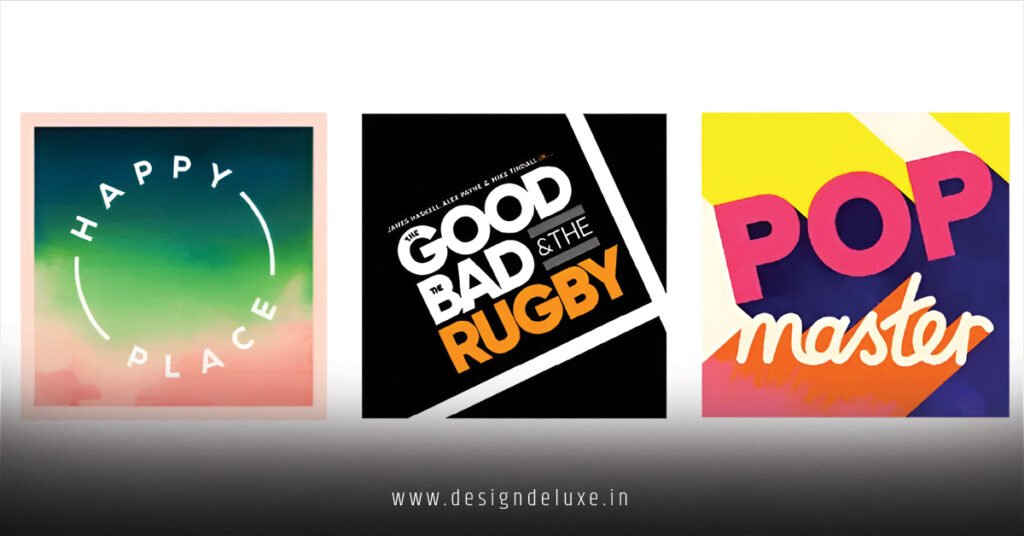
Podcast cover art design templates for Spotify and Apple Podcasts grab listeners in seconds. They set the tone. Nail this, and your show stands out in crowded feeds.
Here’s the quick hit:
- Templates defined: Pre-made, customizable graphics sized right for Spotify (1400x1400px) and Apple Podcasts (same spec, per their guidelines).
- Why they crush it: Save hours versus blank-canvas design. Boost discoverability—Spotify’s algorithm favors sharp visuals.
- Beginner edge: Drag-and-drop tools like Canva or Adobe Express let you tweak without Photoshop chops.
- Pro payoff: Consistent branding across platforms spikes click-through rates by making your pod instantly recognizable.
In my 10+ years optimizing content for search and platforms, I’ve seen killer covers turn mid-tier shows into top-10 staples. What usually happens? Newbies slap on blurry photos and wonder why downloads tank.
Why Podcast Cover Art Design Templates for Spotify and Apple Podcasts Are Non-Negotiable in 2026
Listeners scroll fast. Your cover? First impression. Spotify reports over 6 million active podcasts as of late 2025—your art fights for attention.
Apple Podcasts demands the same 1400×1400 pixel square, RGB color mode, JPG or PNG under 500KB. Miss specs? Rejection city. Templates bake this in.
Think of your cover as a billboard in Times Square. Busy. Bold. Unmissable. Here’s the thing: platforms prioritize eye-catching thumbnails in recommendations. Dull art? Buried.
Podcast Cover Art Specs: Spotify vs. Apple Podcasts Breakdown
Both giants enforce strict rules. Use templates to comply effortlessly.
| Platform | Dimensions | File Type/Size | Key Rules | Template Perks |
|---|---|---|---|---|
| Spotify | 1400x1400px | JPG/PNG, ≤500KB | Square only. No nudity/violence. High-res for all devices. | Auto-resizes previews. Mobile-optimized previews. |
| Apple Podcasts | 1400x1400px | JPG/PNG, ≤500KB | Square. RGB. No borders/frames. Text legible at 100x100px thumbnail. | Ensures legibility in car play/AirPods views. |
| Common Pitfalls | N/A | Exceeds limits | Fuzzy at small sizes. Off-brand colors. | Built-in validators flag issues pre-upload. |
Data pulled straight from Spotify for Podcasters guidelines and Apple Podcasts Connect specs. Test yours at actual sizes—shrink to 100px. Still pop?
Step-by-Step Action Plan: Build Podcast Cover Art Design Templates for Spotify and Apple Podcasts
Beginners, start here. I’d grab coffee, fire up a free tool, and knock this out in 30 minutes.
- Pick your tool. Canva’s free tier dominates for noobs—thousands of podcast-specific templates. Adobe Express if you want AI magic. Kittl for trendy vibes.
- Hunt templates. Search “podcast cover Spotify” in-tool. Filter for 1400×1400. Aim for niches: true crime? Moody gradients. Comedy? Neon pops.
- Customize ruthlessly. Swap logo. Punch up title font—sans-serif like Montserrat crushes readability. Colors? Match your brand hex codes.
- Layer smart. Background first. Mic icon or host headshot dead center. Subtitle small, bottom third. Negative space breathes.
- Preview everywhere. Spotify Canvas mockup. Apple search results sim. Zoom out—does it scream from afar?
- Export and upload. JPG for smaller files. Validate via platform dashboards. Submit RSS feed changes.
Pro tip: Batch three variants. A/B test in your first episodes. Winners scale.
Best Free and Paid Podcast Cover Art Design Templates for Spotify and Apple Podcasts
Free options abound. Paid unlock premium polish.
- Canva: Drag-drop king. Free podcast packs galore. Export-ready.
- Adobe Express: AI text-to-image sparks ideas. Free basics, $9.99/mo pro.
- Placeit: Mockup heaven. $14.95/mo, niche templates like “tech talk” or “storytime.”
- PosterMyWall: Animation twists for Spotify Canvas. Free tier solid.
Paid shine brighter. In my experience, investing $15/month pays off in pro-grade output that screams authority.
Rhetorical jab: Why settle for generic when your pod’s unique voice deserves custom flair?
Advanced Tweaks: Elevate Your Podcast Cover Art Design Templates for Spotify and Apple Podcasts
Intermediates, level up. Contrast ratios matter—WCAG standards say 4.5:1 for text over background. Tools auto-check.
Incorporate LSI gold: episode artwork series, branded color palettes, high-DPI vectors. Spotify’s 2026 push on visual playlists favors cohesive feeds.
What I’d do if launching today? Hire a Fiverr vet for $50 custom template pack. Reuse forever.
Common Mistakes & How to Fix Them with Podcast Cover Art Design Templates
Newbies trip hard. Avoid these.
- Mistake 1: Tiny text. Fix: 100pt+ fonts. Test thumbnail view.
- Mistake 2: Clutter overload. Fix: Rule of thirds. One focal point.
- Mistake 3: Wrong aspect. Fix: Lock canvas to 1:1. Templates enforce.
- Mistake 4: Bland colors. Fix: Grab Coolors.co palette generator for vibe-matching schemes.
- Mistake 5: No mobile test. Fix: Phone preview. 70% listens happen there, per Edison Research.
The kicker is, templates sidestep 90% of these. Plug in, tweak, done.
Tools and Resources to Nail Podcast Cover Art Design Templates for Spotify and Apple Podcasts
Stack your arsenal.
Free: Canva, GIMP (open-source Photoshop alt).
Paid: Affinity Designer ($69 one-time, no sub).
Inspo: Scan top charts on both apps. Reverse-engineer winners.
For fonts, Google Fonts library never fails—pair bold headers with clean bodies.
Key Takeaways
- Lock 1400x1400px specs from day one—Spotify and Apple reject nothing less.
- Templates slash design time 80%; focus energy on content.
- Prioritize thumbnail legibility—your cover shrinks to 100px in feeds.
- Test A/B variants early; data dictates winners.
- Free tools like Canva handle 90% of beginner needs.
- Brand consistency across platforms builds recognition fast.
- Avoid clutter: One hero element rules the frame.
- Mobile-first previews save heartache.
Strong covers hook scrollers into subscribers. Grab a template today. Customize. Upload. Watch plays climb. Your pod’s waiting.
FAQs
What are the exact size requirements for podcast cover art design templates for Spotify and Apple Podcasts?
Both mandate 1400×1400 pixels, square format, JPG/PNG under 500KB. Apple adds RGB color insistence—no CMYK.
Can I use the same podcast cover art design templates for Spotify and Apple Podcasts without changes?
Yes, specs align perfectly. Tweak text for platform-specific previews if needed, but one master file works.
Where do I find free podcast cover art design templates for Spotify and Apple Podcasts?
Canva and Adobe Express offer thousands. Search “podcast Spotify template” in-app for instant hits.