Logo DesignBrandSocial Media AdvertisingWebsite
Adaptive Logo Design for Social Media Ads and Website Branding 2026 is the smart way brands stay sharp across every screen and platform this year. Your logo doesn’t just sit there looking pretty anymore. It shifts, simplifies, expands, and performs—whether it’s a tiny favicon, a bold Instagram ad, or a full website header.
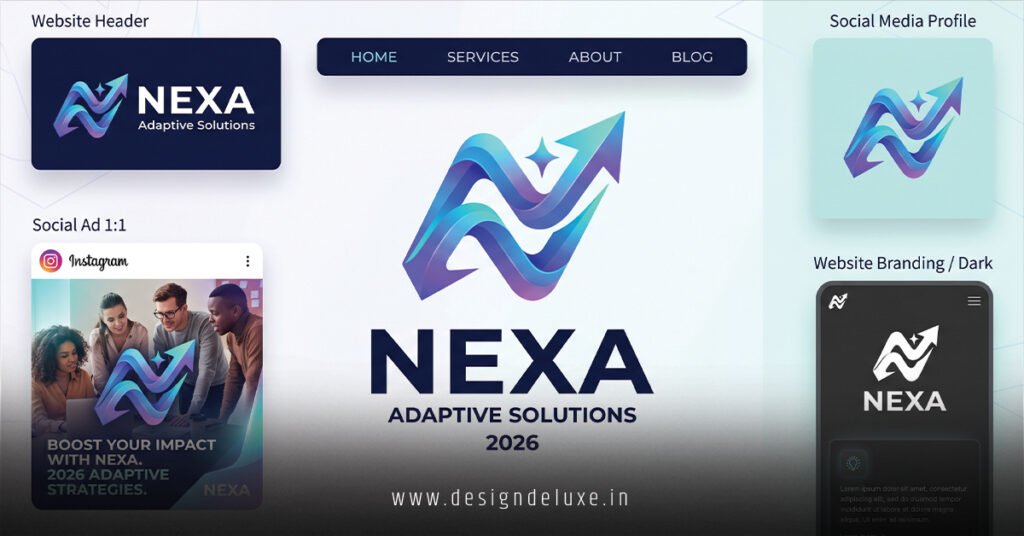
- What it is: A flexible logo system with multiple versions (full lockup, icon-only, simplified mark) built to adapt to context, size, and format while keeping core recognition intact.
- Why it matters: Mobile traffic dominates at roughly 52-60% of web visits in 2026, and social media ad spend hits massive numbers like $317 billion globally. A static logo gets lost or looks sloppy fast.
- The payoff: Better visibility, stronger recall, higher engagement in ads, and a professional edge on websites.
- Who needs it: Beginners building their first brand and intermediates refreshing existing ones for digital-first performance.
- The kicker: Brands that nail this look consistent everywhere without extra hassle.
Here’s the thing. In my experience, most new brands start with one gorgeous logo file and call it a day. Then reality hits—blurry icons on mobile, cramped ads on Facebook, or a header that eats half the homepage. Adaptive systems fix that from day one.
Why Adaptive Logo Design Rules in 2026
Static logos feel outdated fast. Digital spaces demand flexibility. On a desktop site, you get the full wordmark with tagline. On a Stories ad or app icon, it collapses to a clean symbol. Colors might shift for dark mode. Elements simplify for tiny thumbnails.
This isn’t gimmicky animation everywhere. It’s strategic. Think of it like a wardrobe that works for boardroom, beach, and everything between—one core identity, multiple outfits.
Mobile rules everything. With over half of web traffic on phones and social ads mostly viewed on mobile, your logo must crush small screens. Poor performance here kills first impressions.
Social ads amplify the need. Platforms serve vertical video, square posts, carousels, and Stories. One rigid file won’t cut it across Meta, TikTok, LinkedIn, or X.
Core Elements of Strong Adaptive Logo Design for Social Media Ads and Website Branding 2026
Build a true system, not random variations.
- Master logo (primary lockup): Full version for hero sections and big displays.
- Icon/monogram: Recognizable at 16×16 pixels or as profile pics.
- Simplified mark: Strips details for small or busy ad backgrounds.
- Horizontal and stacked versions: For different layout needs.
- Color variants: Full color, monochrome, reversed, dark/light mode.
- Motion-ready elements: Subtle animations for loading or hover states.
Pro tip from the trenches: Start with black and white. Nail the shape and proportions first. Color comes later. This saves headaches down the road.
Step-by-Step Action Plan for Beginners
Don’t overthink. Follow this and you’ll have a solid system in a weekend or two.
- Define your core mark. Sketch 3-5 simple concepts. Focus on one strong idea that scales.
- Create variations. Design full, icon, horizontal, and simplified versions in your tool of choice (Figma recommended for easy exports).
- Test mercilessly. Drop them into real mockups: Instagram ad templates, website headers, mobile favicons, dark backgrounds.
- Build brand guidelines. Document exact usage rules—minimum sizes, clear space, color codes, do’s and don’ts.
- Export smart files. SVG for web scalability, PNG with transparency for ads, high-res for print if needed.
- Implement and monitor. Update your site and ad accounts. Track performance—click-throughs, brand recall mentions.
What I’d do if starting fresh: Use Figma components for the logo system. Link variations so one change updates everything. Saves massive time.
Adaptive Logo Design Comparison Table
| Aspect | Static Logo | Adaptive System (2026 Best Practice) | Winner & Why |
|---|---|---|---|
| Small Screen Performance | Often blurry or cramped | Clean, recognizable icon version | Adaptive – Higher recall on mobile |
| Social Ad Versatility | One file stretched awkwardly | Tailored for square, vertical, stories | Adaptive – Better engagement |
| Website Integration | Takes too much space | Responsive across breakpoints | Adaptive – Cleaner layouts |
| Dark/Light Mode | Needs manual fixes | Built-in variants | Adaptive – Seamless UX |
| Maintenance Time | High (fix per platform) | Low (one system) | Adaptive – Scales with growth |
| Cost Long-Term | Redesigns every 1-2 years | Flexible for years | Adaptive – Better ROI |
Common Mistakes & How to Fix Them
Mistake 1: Too much detail in the main mark.
Fix: Simplify ruthlessly. If it doesn’t work at 50px wide, strip it. Your icon version is the ultimate test.
Mistake 2: Ignoring platform specs.
Fix: Check official ad guidelines. Design for safe zones—text and key elements away from edges that get cropped.
Mistake 3: Inconsistent color across contexts.
Fix: Define primary, secondary, and monochrome palettes. Test on actual ad backgrounds.
Mistake 4: No guidelines for your team or freelancers.
Fix: Create a simple one-page PDF. Include approved files and rules. Saves endless revisions.
Mistake 5: Treating it as one-and-done.
Fix: Review every 12-18 months. Markets shift. Your system should evolve too.
Tools and Resources Worth Your Time
Figma stands out for collaborative systems and easy responsive prototyping. For inspiration, study how big brands handle it—though yours doesn’t need to match their budget.
Check W3C guidelines on responsive design for technical implementation basics on websites. For ad creative, platforms like Meta’s Blueprint offer free specs.
Key Takeaways
- Adaptive logo design for social media ads and website branding 2026 turns one asset into a full performance system.
- Prioritize scalability and context over fancy effects.
- Mobile-first thinking wins—test on phones obsessively.
- Simplicity plus flexibility beats complexity every time.
- Guidelines protect your brand as it grows.
- Regular testing beats guessing what works.
- Strong systems boost recognition and save redesign money later.
- Start basic, iterate fast.
Nail adaptive logo design for social media ads and website branding 2026 and your brand suddenly feels everywhere—professional, modern, and impossible to ignore. The next step? Open Figma or your favorite tool today. Sketch your core mark, then build the first two variations. Momentum beats perfection.
FAQs
What exactly makes a logo “adaptive” for 2026 social ads and websites?
It uses a family of versions that intelligently change based on where they appear—full details on big screens, stripped-down for tiny icons or fast-scrolling ads—while staying instantly recognizable.
How much should beginners budget for adaptive logo design for social media ads and website branding 2026?
Expect $800–$3,000 for a solid custom system from a pro, depending on complexity. DIY with templates can start under $200 but invest more as revenue grows for true ownership.
Can I update an old logo into an adaptive system without a full redesign?
Yes. Most times you keep the core elements and create variations for different uses. A good designer audits what works now and builds the flexible versions around it.