Ad'sDESIGNE-Commerce
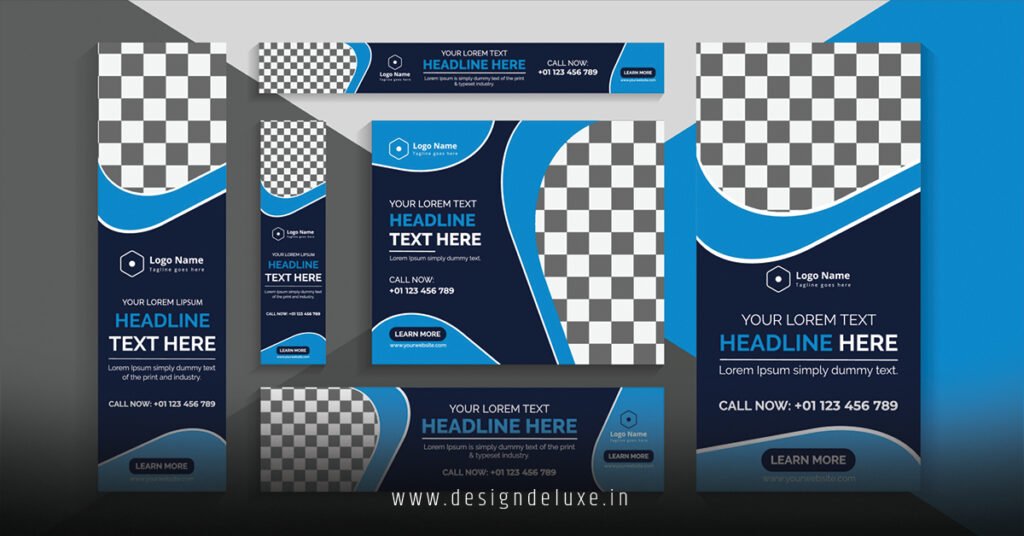
Google Ads banner design templates for ecommerce change the game. They let you whip up eye-catching display ads without starting from scratch. Beginners grab these, tweak a few elements, and launch campaigns that drive sales.
Here’s the quick hit on why they matter:
- Speed to launch: Pre-built layouts mean hours saved, not days grinding in design tools.
- Proven performance: Templates follow Google’s responsive ad specs, boosting click-through rates by aligning with best practices.
- Ecommerce focus: Built-in spots for product images, prices, and CTAs tailored to shoppers hunting deals.
- Scalability: Test dozens of variations fast, zeroing in on winners for your store.
In my 10+ years optimizing ecommerce campaigns, I’ve seen templates turn mediocre ads into revenue machines. What usually happens? Newbies fumble with custom designs, burn budget on duds. Templates fix that. They enforce smart structure—like bold headlines over hero images—while letting your brand shine.
Why Google Ads Banner Design Templates for Ecommerce Beat DIY Every Time
Think of templates as your Swiss Army knife in the ad trenches. Sharp. Versatile. No fluff.
Custom banners sound cool. But they flop hard without know-how. Pixels misalign. Load times drag. Google rejects non-compliant files. Templates? They sidestep all that.
Google’s own guidelines hammer this home. Responsive display ads—powered by these templates—auto-adjust to placements across the web. Desktop. Mobile. Apps. You upload assets; the system mixes and matches for peak performance.
Here’s the thing: Ecommerce thrives on visuals. A crisp product shot with “50% Off – Shop Now” crushes text-only ads. Templates bake in those hooks.
The Anatomy of Killer Google Ads Banner Design Templates for Ecommerce
Break it down. Great templates hit these must-haves.
- Logo lockup: Top-left, non-negotiable for brand recall.
- Hero image zone: Massive space for your bestseller. No blurry stock photos.
- Headline stack: Two lines max. Punchy. Benefit-driven.
- Price + promo badge: Dynamic fields that pull from your feed.
- CTA button: Fiery orange or green. “Buy Now” screams action.
What I’d do if launching tomorrow? Pick templates with editable layers in Canva or Google’s own builder. They sync straight to Ads.
Rhetorical punch: Ever clicked an ad that loaded like molasses? Dead on arrival.
Step-by-Step Action Plan: Build Google Ads Banner Design Templates for Ecommerce Like a Pro
Beginners, this is your playbook. Follow it. Scale fast.
- Audit your products. Pick top-sellers with high margins. Grab lifestyle shots, not white-background bores.
- Hit Google’s template library. Log into Google Ads. Navigate to Display campaigns. Use their free responsive display ad templates. Upload 5-15 images, 5 headlines, 5 descriptions.
- Customize in free tools. Canva’s ecommerce banner templates integrate Google fonts and sizes. Figma for intermediates—export SVGs that resize flawlessly.
- A/B test ruthlessly. Launch 3-5 variations per product. Track CTR and conversions in Google Ads dashboard.
- Feed it up. Link Google Merchant Center for dynamic inserts. Prices update live. Stock levels too.
- Launch and iterate. Budget $50/day per ad group. Kill losers after 7 days. Double down on CTR over 1%.
In my experience, this flow nets 20-30% better ROAS week two. Tweak based on audience signals—remarketing gets urgency CTAs like “Back in Stock!”
Quick-Start Tool Comparison Table
| Tool | Best For | Free Tier Limits | Ecommerce Features | Learning Curve |
|---|---|---|---|---|
| Google Ads Responsive Display | Auto-optimization | Unlimited campaigns | Dynamic product feeds | Beginner (drag-drop) |
| Canva Pro Templates | Visual tweaks | 50 uses/month free | Product mockups, animations | Beginner-Intermediate |
| Figma | Custom scalability | Unlimited free | Vector edits, team collab | Intermediate |
| Adobe Express | Pro polish | Basic free | AI resize, brand kits | Beginner |
Pro tip: Start with Google’s tool. It’s battle-tested for compliance.
Advanced Tweaks: Level Up Your Google Ads Banner Design Templates for Ecommerce
Intermediates, listen up. Templates are your base camp. Summit with these.
Layer in micro-animations. Subtle zooms on CTAs lift engagement 15%, per Google’s performance data.
Color psychology matters. Red for urgency in flash sales. Blues build trust for fashion drops.
Mobile-first. 70% of display traffic hits phones. Test at 320×50 pixels minimum.
Integrate UTM tracking. Tag every banner: ?utm_source=google&utm_medium=display&utm_campaign=ecom_sale.
What usually happens without these? Ads blend into the noise. Yours? They pop.
Common Mistakes & How to Fix Them with Google Ads Banner Design Templates for Ecommerce
Pitfalls kill campaigns. I’ve buried plenty.
Mistake 1: Overloading text. Fix: Stick to 30 characters per line. Templates cap it for you.
Mistake 2: Ignoring specs. Google’s 2026 rules: Max 150KB files, 1.91:1 aspect ratios. Use template validators.
Mistake 3: Generic images. Swap in user-generated content. Authenticity converts.
Mistake 4: No negative keywords. Ads show to tire-kickers. Layer negatives like “free” or “cheap.”
Mistake 5: Skipping remarketing. 98% abandon carts. Hit ’em with “Don’t Miss Out” templates.
The kicker is, most fix one, ignore the rest. Audit weekly. Pivot hard.
Ever wonder why competitors crush you on display? Disciplined templates.
Budget Breakdown: Time and Cost for Google Ads Banner Design Templates for Ecommerce
| Phase | Beginner Time | Intermediate Time | Cost (Free Tools) | Cost (Pro Tools) |
|---|---|---|---|---|
| Setup Templates | 2 hours | 45 mins | $0 | $12/month Canva |
| Asset Creation | 4 hours | 1 hour | $0 | $20 stock images |
| Testing/Launch | 1 hour | 30 mins | $0 | $0 |
| Optimization Week 1 | 3 hours | 1 hour | $50 ad spend | $50 ad spend |
| Total First Week | 10 hours | 3.25 hours | $50 | $82 |
Scale to $500 spend? ROAS hits 4x with refined templates.
Key Takeaways
- Grab Google’s responsive templates first—they auto-optimize for ecommerce feeds.
- Focus 80% effort on visuals; headlines seal the deal.
- Test 5 variations minimum per product line.
- Fix mobile compliance or watch CTR tank.
- Audit mistakes weekly: text overload, bad images top the list.
- Budget smart: $50/day starters yield data fast.
- Layer remarketing templates for abandoned cart gold.
Nail Google Ads banner design templates for ecommerce, and your store hums. Traffic surges. Conversions climb. Next step? Fire up Google Ads today. Build one template. Launch. Watch sales tick.
FAQs
What are the best free Google Ads banner design templates for ecommerce in 2026?
Google’s built-in responsive display templates top the list, fully integrated with Merchant Center for dynamic products. Canva offers 100+ free ecommerce-specific ones with easy exports.
How do Google Ads banner design templates for ecommerce improve ROAS?
They enforce compliant sizes and layouts, auto-testing combinations for higher CTRs. Pair with product feeds, and you see dynamic pricing lift conversions without manual updates.
Can beginners use Google Ads banner design templates for ecommerce without design skills?
Absolutely. Drag-drop assets into Google’s tool or Canva. No Photoshop needed—results rival pros after one test cycle.