Social Media Advertising
How to create a content calendar for Instagram is one of those questions that sounds simple until you actually sit down and try it. Then suddenly you’re staring at a spreadsheet, three tabs deep, wondering why your “simple” plan turned into a part-time job. Here’s the quick version before we get into the weeds:
- What it is: a structured schedule mapping out what you post, when, and why.
- Why it matters: consistency drives reach, and reach drives growth — Instagram itself has said repeatedly that regular posting signals an active, engaged account.
- Who needs one: solo creators, small business owners, and social teams juggling multiple platforms.
- What you’ll need: a planning tool, a content mix strategy, and a batch-creation habit.
- The payoff: less daily scrambling, more strategic, on-brand content.
Why a Content Calendar Actually Matters (It’s Not Just Busywork)
Posting randomly is like showing up to the gym whenever you feel like it and expecting a six-pack. Sometimes progress happens. Mostly, it doesn’t. A content calendar turns your Instagram strategy from guesswork into a repeatable system.
In my experience, accounts that post consistently — even just three times a week, every week — outperform accounts that post ten times one week and then vanish for a month. Instagram’s own guidance for creators, published through Meta’s Business Help Center, continues to emphasize posting regularly and using varied formats like Reels, Stories, and carousels to keep the algorithm interested in your account.
The kicker is, a calendar doesn’t just help the algorithm. It helps you. No more 9 p.m. panic-posting. No more staring at a blank caption box wondering what today’s “vibe” should be.
What Goes Into a Solid Instagram Content Calendar
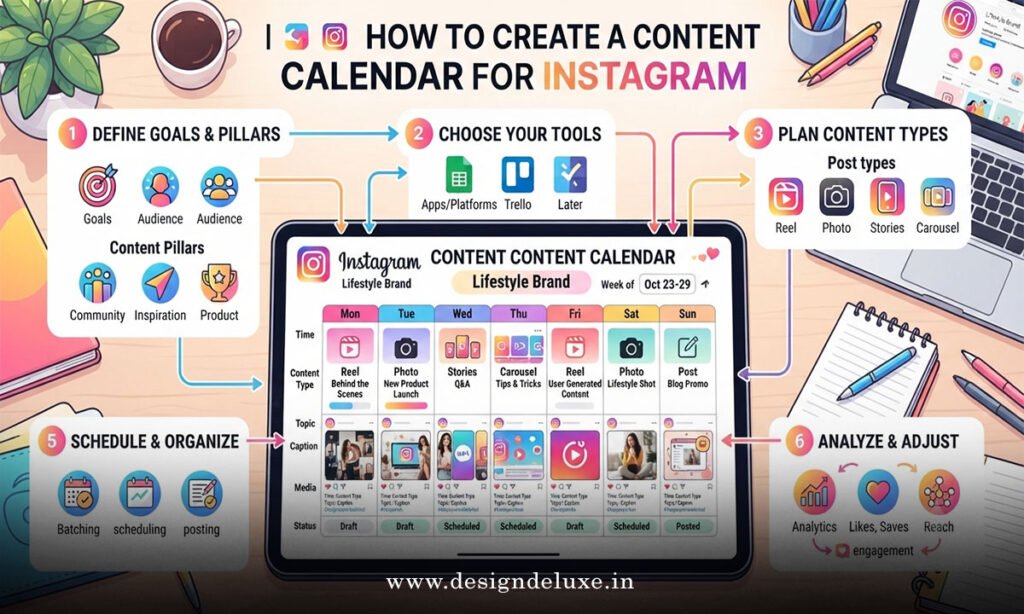
Before you open a spreadsheet, get clear on what actually needs planning. A real calendar covers more than just dates.
- Content pillars — your 3–5 recurring themes (education, behind-the-scenes, promotions, testimonials, entertainment).
- Post format — feed post, Reel, carousel, or Story.
- Publishing date and time — ideally based on when your specific audience is active.
- Captions and hashtags — drafted ahead, not improvised.
- Visual assets — this is where having a stocked library of Instagram Design Templates: 50+ Ready-to-Use Graphics saves you serious time, since you’re not designing from scratch for every single slot.
Miss any of these pieces, and your calendar turns into just a list of dates with nothing useful attached to them.
Step-by-Step Action Plan: Building Your Calendar From Scratch
Let’s get practical. Here’s the exact sequence I’d follow if I were starting fresh today.
- Define your content pillars first. Pick three to five recurring topics your audience actually cares about — not just what you feel like posting.
- Audit your posting frequency. Be honest about how much you can realistically sustain — three posts a week beats seven posts for two weeks then burnout.
- Choose your planning tool. Options range from a simple Google Sheet to dedicated platforms like Later or Buffer.
- Map out a monthly theme. Give each month a loose focus — product launches, seasonal content, community stories.
- Slot content types into each day. Assign formats (Reel, carousel, Story) based on what performs best for your niche.
- Batch your visuals in one sitting. Pull from a ready-made set — this is exactly where Instagram Design Templates: 50+ Ready-to-Use Graphics comes in clutch, letting you knock out a week’s worth of graphics in an afternoon.
- Write captions in bulk. Draft five to seven captions back-to-back rather than one at a time.
- Schedule everything. Use your chosen tool’s scheduling feature so publishing happens without you touching your phone that day.
- Review performance weekly. Adjust the calendar based on what’s actually resonating, not just what you assumed would work.
Nine steps. That’s genuinely all it takes to go from chaos to a functioning system.
Comparing Content Calendar Tools
Not every tool fits every budget or skill level. Here’s how the popular options stack up:
| Tool | Cost | Best Feature | Best For |
|---|---|---|---|
| Google Sheets / Notion | Free | Total customization | Beginners and solo creators on a budget |
| Later | Free tier / Paid from ~$16.67/mo | Visual drag-and-drop calendar | Creators who want a clean feed preview |
| Buffer | Free tier / Paid from ~$6/mo per channel | Straightforward scheduling | Small businesses managing multiple platforms |
| Meta Business Suite | Free | Native Instagram/Facebook integration | Anyone wanting a no-cost, official option |
Common Mistakes & How to Fix Them
Even people who mean well trip over the same handful of issues. Let’s clear them up.
Mistake 1: Planning content without checking analytics first. You end up guessing what your audience wants. Fix it by reviewing your last 90 days of Instagram Insights before mapping a single post.
Mistake 2: Overloading the calendar with promotional content. Nobody follows a brand that only sells. Fix it with an 80/20 split — mostly value and connection, occasionally direct promotion.
Mistake 3: Designing graphics one post at a time. This is the fastest route to burnout. Fix it by batch-customizing a template pack — again, this is exactly why keeping Instagram Design Templates: 50+ Ready-to-Use Graphics on hand matters, because it turns “design panic” into “grab and edit.”
Mistake 4: Ignoring optimal posting times. Posting into a dead zone kills reach before your content even has a chance. Fix it by checking your audience activity data inside Instagram’s native Insights tool.
Mistake 5: Never reviewing performance. A calendar built once and never revisited becomes stale fast. Fix it with a 15-minute weekly check-in comparing what worked against what flopped.
Fitting Templates Into Your Calendar Workflow
Here’s where the whole system clicks into place. A calendar tells you what to post and when. A template library tells you how to make it look good, fast. Pair them, and you’ve basically automated the two most time-consuming parts of running an Instagram account.
Say your calendar slots in a “Monday Motivation” quote post every week. Instead of designing that from zero each time, you’d pull from a fixed rotation within Instagram Design Templates: 50+ Ready-to-Use Graphics, swap the quote and image, and you’re done in five minutes flat.
Is that lazy? Not even close. That’s exactly how professional social teams operate — repeatable systems, not reinvention every single week. According to CoSchedule’s Marketing Statistics report, marketers who document and systemize their content strategy are significantly more likely to report it as effective compared to those working without a documented plan.
Adjusting Your Calendar Over Time
A content calendar isn’t a “set it and forget it” document. Treat it more like a living draft — something you revisit monthly based on real performance data, seasonal shifts, and whatever’s currently resonating with your niche.
What usually happens is people build a beautiful calendar in January and abandon it by March because life got busy. Don’t let that be you. Block 15 minutes every Sunday to glance at what’s scheduled and tweak anything that feels off.
If a format underperforms two weeks running, swap it. If a content pillar consistently gets crickets, retire it. The calendar should bend to your data, not the other way around.
Key Takeaways
- A content calendar turns random Instagram posting into a repeatable, strategic system.
- Content pillars, formats, timing, captions, and visuals all need a slot in your plan — not just dates.
- Free tools like Google Sheets work fine for beginners; Later and Buffer add scheduling automation as you scale.
- Pairing your calendar with a ready template library — like Instagram Design Templates: 50+ Ready-to-Use Graphics — cuts your weekly design time dramatically.
- An 80/20 mix of value-driven and promotional content keeps followers engaged without feeling sold to.
- Weekly performance check-ins keep your calendar responsive instead of stale.
- Batching captions and graphics in one sitting beats daily last-minute scrambling every time.
Building a content calendar isn’t about rigid perfection — it’s about giving yourself a system so Instagram stops feeling like a daily fire drill. Start small, batch your visuals using a solid template library, and adjust based on real data every week. That one habit alone will save you more hours than any growth hack ever will.
FAQs
How far in advance should I plan my Instagram content calendar?
Most creators find a monthly plan with weekly flexibility works best — enough structure to stay consistent, enough room to adjust for trends or real-time events.
Can I create a content calendar for Instagram without paid tools?
Absolutely. A well-organized Google Sheet or Notion board handles the planning fine; you’ll just need to schedule posts manually or through Meta Business Suite’s free scheduler.
How does a content calendar work with design templates?
Your calendar tells you what to post and when, while a set like Instagram Design Templates: 50+ Ready-to-Use Graphics gives you the visual assets to fill those slots quickly, cutting your production time down significantly.