Ad's
Instagram carousel ad templates are pre-designed, customizable frameworks that let you build multi-slide ads without starting from scratch.
Think of them as blueprints. You fill in your brand colors, copy, and images. Launch in minutes instead of hours.
Here’s the quick overview:
- What they are: Ready-made slide layouts for 5-10 card ads on Instagram.
- Why they matter: Cut design time by 60-70%, especially for beginners.
- Where to find them: Canva, Adobe Express, Meta Ads Manager, Figma.
- 2026 edge: AI-powered templates now auto-generate variations based on your product feed.
- ROI reality: Templates don’t guarantee performance, but consistency does—and templates enforce it.
Let me walk you through it.
Why Instagram Carousel Ad Templates Are Game-Changers for 2026
Here’s the thing: Design paralysis kills campaigns.
You stare at a blank canvas. Where do slides go? What’s the flow? Copy or images first?
Templates obliterate that.
They give you a proven skeleton. You slot in your specifics.
Result? Faster launch. Better consistency. Less brain bleed.
In 2026, speed wins. Algorithms reward fresh creative weekly. Templates let you iterate fast.
And here’s the kicker: Templates embed best practices—visual hierarchy, mobile optimization, white space—by default.
You inherit what experts learned the hard way.
What Exactly Are Instagram Carousel Ad Templates?
Straightforward.
A template is a pre-built slide deck in a design tool.
Each slide has:
- Placeholder zones for images.
- Text fields with starter copy.
- Brand color swatches.
- CTA buttons (pre-positioned).
- Grid overlays to keep alignment tight.
You don’t reinvent the wheel. You rebrand it.
Templates come in flavors:
- E-commerce: Product showcase arcs (before/after, feature-by-feature).
- SaaS: Problem-solution journeys.
- Lifestyle: Aspirational narratives.
- Local: Event or promo countdowns.
Beginner-friendly? Canva has 500+ carousel templates. Drag. Drop. Done.
Pro level? Figma templates give pixel control. Designer flex.
Meta’s native builder? Simple but less customizable—good for fast tests.
The Difference Between Templates and Custom Design
| Aspect | Templates | Custom Design |
|---|---|---|
| Design Time | 15-30 min | 2-8 hours |
| Cost | $0-20/month (tool) | $300-1,500+ |
| Learning Curve | Minimal | Steep |
| Flexibility | Good (varied templates) | Unlimited |
| Brand Consistency | High (enforced by structure) | Variable (depends on you) |
| Best For | Startups, quick tests, scale | Unique brand positioning |
Real talk: Templates aren’t inferior. They’re strategic shortcuts for teams short on design bandwidth.
I’ve run templates for D2C brands and watched ROAS improve simply because creative shipped weekly instead of monthly.
Where to Find High-Quality Instagram Carousel Ad Templates
Canva (Easiest for Beginners)
Free tier has solid carousel templates. Pro ($13/mo) unlocks thousands.
Browse “Instagram Carousel Ads.” Filter by industry.
Pro move: Duplicate a template, tweak it, save as your own brand template. Reuse endlessly.
Adobe Express (Middle Ground)
Cleaner UI than Canva. Templates sync with Adobe Stock (paid).
Good if you already use Adobe CC.
Meta Ads Manager (Native, Limited)
Built-in templates when you create a campaign.
Fast but fewer options. Best for A/B testing quick variations.
Figma (Pro Designer Playground)
Search Figma Community for carousel templates. Free ones exist; paid ($20-100+) are slick.
Pixel-perfect control. Overkill for beginners.
Specialized Platforms
- Shogun: E-comm heavy.
- Unbounce: Landing page + carousel hybrid.
- Smartly.io: Enterprise-grade, auto-optimization.
Pick one. Master it. Don’t template-hop.
Step-by-Step: Using Instagram Carousel Ad Templates Like a Pro
Step 1: Choose Your Template Type
What’s your story?
- Launching a product? “Product reveal” template.
- Building brand awareness? “Lifestyle carousel.”
- Driving signups? “Problem-solution journey.”
Be specific. Wrong template kills momentum.
Step 2: Download or Open in Your Tool
Canva: “Create a design” → “Instagram carousel ad.”
Figma: Open file → “Duplicate.”
Meta: New campaign → “Carousel” → pick layout.
Step 3: Replace Placeholder Images
Edit each slide.
Upload your images. Drag to fit.
Pro tip: Batch-resize images beforehand (1080x1080px standard). Saves friction.
Mobile preview mode exists. Use it obsessively. Crops matter.
Step 4: Customize Copy
Per-slide text should be 1-2 lines. Max.
Opening hook? Question or jolt.
Middle slides? Build tension.
Closing? CTA + urgency.
Don’t overcomplicate. Swipes punish walls of text.
Step 5: Brand It
Colors, fonts, logos.
Most templates have “brand kit” sections. Fill once. Auto-apply everywhere.
Consistency = trust.
Step 6: Export and Launch
Download as PNG/PDF (if Meta posting later) or publish direct to Ads Manager.
Pro-level: A/B test two template variants. Track swipe rates. Kill losers.
Common Instagram Carousel Ad Template Mistakes (And Fixes)
Templates are tools, not magic wands.
Mess these up, templates don’t save you.
- Using template as-is without customization. Looks generic. Fix: Rebrand heavily. Your colors, voice, images.
- Cramming too much copy. Contradicts template elegance. Fix: 3-5 words per slide. Full stop.
- Ignoring mobile preview. Slides crop weird. Fix: Preview before launch. Every. Time.
- Misaligned product images. Looks sloppy. Fix: Use consistent backgrounds or white-space.
- Wrong template for your story. Forced fit. Fix: Pick templates that match your narrative arc.
- No CTA consistency. Buttons don’t match brand. Fix: Use template’s CTA layer, tweak colors only.
From experience: Beginners over-customize (makes it ugly) or under-customize (looks stolen).
Find the middle.
Instagram Carousel Ad Templates: Beginner vs. Intermediate vs. Pro
Beginner
Use Canva free tier. Pick a template. Plug in images and copy. Launch.
Done in 20 minutes.
Good? Yes. Perfect? No. But it beats overthinking.
Intermediate
Choose platform (Canva Pro or Adobe Express).
Build a personal brand template library.
Test two variations weekly.
Track swipe rates. Double down on winners.
Takes 30-45 min per carousel.
Pro
Custom Figma templates tied to your design system.
Automate via API (Zapier + Figma).
Use data to dynamically swap slides per user segment.
Advanced but worth it at scale.
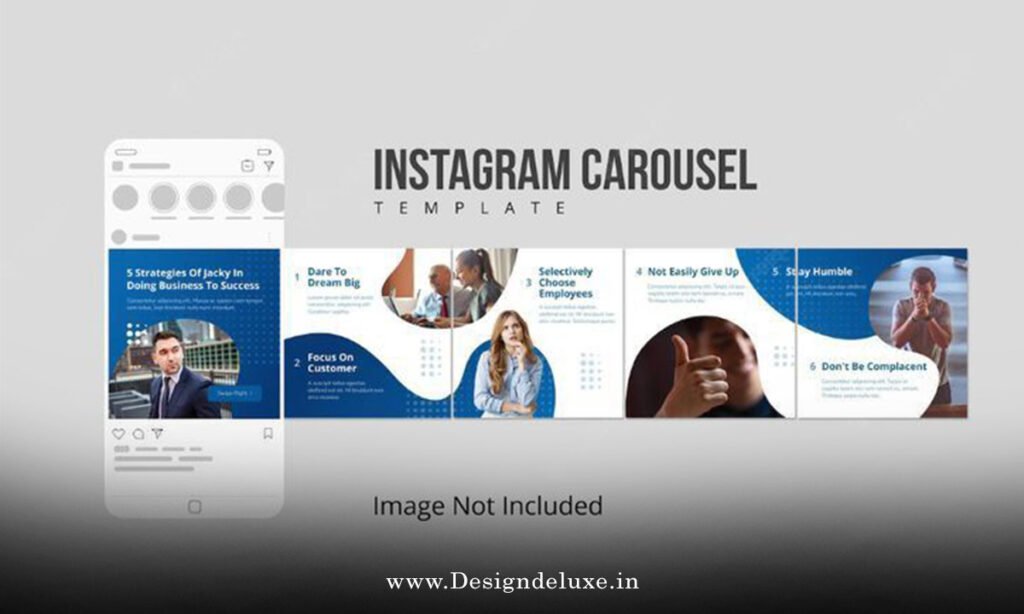
Integrating Story-Driven Carousel Ad Designs for Instagram Storytelling With Templates
Here’s where it clicks:
Templates give structure. Story-driven frameworks give narrative soul.
Combine them.
Pick a template that supports your story arc:
- Slide 1-2: Hook template (question + image jolt).
- Slides 3-6: Build template (feature showcase or journey montage).
- Slides 7-8: Resolution template (testimonial or payoff).
- Slide 9-10: CTA template (offer + urgency).
Templates scaffold the visuals. Your story fills the emotional gaps.
In fact, Instagram’s own creator hub now suggests story-arc templates when you select “Carousel Ad.”
They’ve clued in: Templates + narrative = conversions.
Best Practices for Customizing Instagram Carousel Ad Templates
- One template = one campaign variable. A/B test copy, not design.
- Batch create. Make 3-5 carousel variants in one sitting.
- Use template fonts sparingly. 2 typefaces max.
- Mobile-first always. If it looks good on phone, desktop follows.
- Maintain brand grid. Templates have spacing rules. Respect them.
- Test animations if available. Subtle zoom or fade on swipes. Not Vegas.
Rule: Templates are guides, not straitjackets.
Bend them. Don’t break them.
2026 Template Trends: AI, Automation, and Personalization
Canva now uses AI to generate carousel variations from a single image.
Figma’s plugins auto-layout templates based on your content library.
Meta’s Advantage+ campaigns pick templates and tweak them dynamically.
Game changer?
Kind of.
AI templates still need human judgment. They’re fast, not smart.
But for grinding out 20 carousel variants for A/B testing? They cut hours.
Expect more automation here.
Regional Customization: India vs. USA Carousel Ad Templates
Templates are global. Context isn’t.
India: Festive templates dominate. Bright, warm palettes. Multi-language support needed.
USA: Minimalist, trend-forward designs. Speed and urgency copy.
Both: Testimonial templates win big.
What I’d do: Duplicate a template. Create regional variants.
Change color temp, language, imagery.
Keep layout. Test both markets.
Geo-targeting handles distribution. Templates handle localization.
Tools Comparison: Which Template Platform Wins?
| Tool | Best For | Learning Curve | Cost | Mobile Preview |
|---|---|---|---|---|
| Canva | Beginners, quick tests | 5 min | Free–$180/yr | Excellent |
| Adobe Express | Adobe users | 15 min | Included or $10/mo | Good |
| Meta Ads Manager | Native integration | 10 min | Free | Good |
| Figma | Designers, custom | 30 min | Free–$12/mo | Excellent |
| Smartly.io | Enterprise, AI-driven | 1+ hour | $$$$ | Excellent |
My pick for you? Start Canva. Graduate to Figma if design matters.
Common Questions About Instagram Carousel Ad Templates
Can I use free templates for paid ads?
Yes. Most tools (Canva, Figma, Meta) allow commercial use of templates. Check licenses. Some demand attribution.
How often should I refresh carousel ad templates?
Weekly if budget allows. At minimum, monthly. Algorithms reward fresh creative.
Do templates limit my brand uniqueness?
Only if you don’t customize. Tweak colors, fonts, copy. It’s your ad.
Can I convert a single-image ad template to carousel?
Sort of. Download the image. Create new carousel. Re-sequence. Faster to start with carousel template.
What’s the best carousel template layout for e-commerce?
Product showcase: Slide 1 = lifestyle. 2-4 = closeups/features. 5 = price/promo. 6 = CTA.
Key Takeaways
- Templates cut design time by 60%+. Start there, not from scratch.
- Combine templates with story-driven frameworks for emotional + structural wins.
- Pick one platform (Canva for ease, Figma for control).
- Customize heavily. Generic templates underperform.
- Mobile preview obsessively.
- Test weekly. A/B template variants, not just copy.
- 2026 trend: AI-generated variations. Use them for testing, not final.
- India/USA need regional tweaks. Same layout, different vibes.
Conclusion
Instagram carousel ad templates aren’t shortcuts that compromise quality. They’re multipliers.
They let you move fast, stay consistent, and test relentlessly—the trifecta of 2026 performance marketing.
Start simple. Pick Canva. Build your first carousel today.
Watch what resonates. Next week, iterate.
That’s the template game. Rinse, repeat, scale.
Your ads just got faster.
Canva Templates Platform — Access 500+ carousel templates, free and paid, with AI variations.
Figma Community Carousel Templates — Browse designer-built templates for pixel-perfect customization.
Meta Ads Manager Native Templates — Native carousel templates, free integration with your ad account.
FAQs
What’s the difference between Instagram carousel ad templates and Story templates?
Carousel templates are feed ads, permanent and saveable. Story templates are ephemeral, vanish in 24 hours. Carousel > Stories for conversion.
Can I use Instagram carousel ad templates for Reels ads?
No. Reel ads are full-screen video. Carousel templates are still multi-slide but static/video-hybrid. Different beast.
How do I ensure my customized carousel ad template meets Instagram’s ad specs?
Check Meta’s official ad specs page. Templates usually comply, but verify image size (1080x1080px), text overlay (<20%), and link format.
Should I use the same carousel ad template for multiple products?
Yes, if products share similar positioning. Reuse structure, swap images/copy. Efficiency wins.
Can I link a carousel ad template slide directly to story-driven carousel ad designs for Instagram storytelling examples?
Not directly, but you can use your carousel ad (built from templates) to funnel to a collection of story-driven carousel ad designs in your Highlights or Landing Page. Cross-promo strategy.